





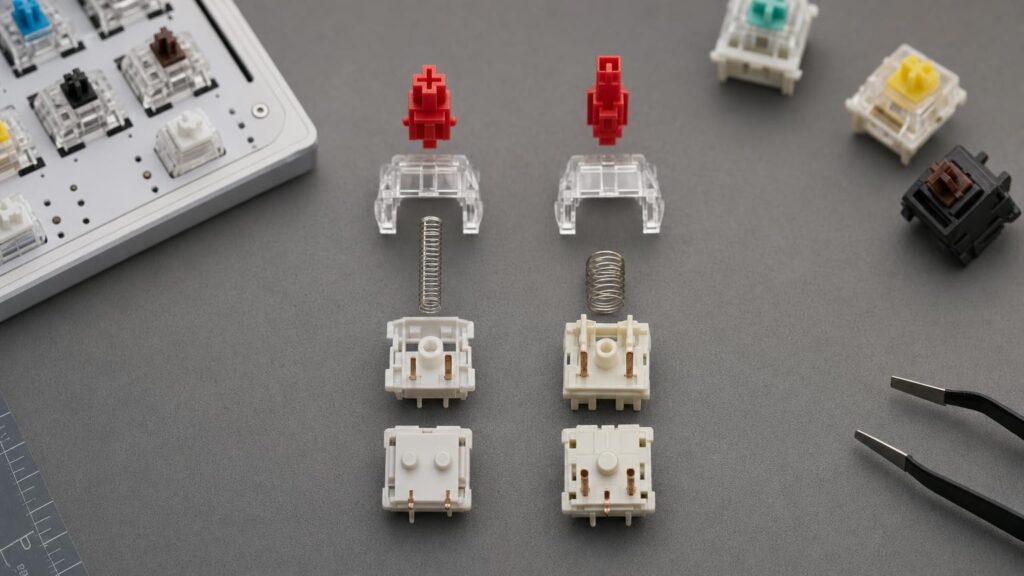
Red, brown, blue and black are familiar labels in the mechanical keyboard world. They are often treated as though they define how a switch will behave: red for linear, brown for tactile, blue for clicky and black for a heavier linear feel. That shorthand can be useful within a particular manufacturer’s range, but it is not a universal technical standard.
A colour does not, by itself, specify a switch’s exact mechanism, spring resistance, actuation point, travel distance, materials, lubrication or mounting format. Two switches with similarly coloured stems may feel and sound noticeably different, and they may not even fit the same keyboard. The useful approach is to treat colour as a product-family label, then look at the underlying specifications.
What a switch colour may – and may not – tell you
Many switch ranges use recurring colour conventions. A red-labelled switch is often linear, meaning it moves without a deliberately designed tactile bump or click. Brown commonly describes a non-clicking tactile switch, while blue is frequently associated with an audible click. Other colours may indicate different spring weights or variations on these designs.
These conventions can help when comparing switches from the same manufacturer, especially when the company provides a consistent family of products. Within that range, colours may distinguish a lighter linear model from a heavier one or separate tactile and clicky mechanisms.
The difficulty begins when colour is used to compare switches across unrelated brands. There is no single authority requiring every “red” switch to have the same force curve, travel or internal geometry. One brand’s red may be lighter, shorter-travel or more heavily lubricated than another brand’s version. Similarly, two brown-labelled switches can have very different tactile bumps, and two blue-labelled switches may create their clicks through different mechanisms.
Even the visible colour can be ambiguous. It might refer to the stem, the housing or a marketing name rather than an agreed performance category. Colour is therefore a starting clue, not a substitute for a specification sheet.
Stem design determines the character of each press
The stem is the moving internal component that travels when a key is pressed. Its geometry helps determine whether the movement feels linear, tactile or clicky. Small differences in the surfaces that interact with the switch contacts and housing can change where feedback occurs, how sharply it is felt and how the switch returns.
Linear, tactile and clicky mechanisms
A linear stem is designed to travel without a deliberate tactile event. That does not mean every linear switch feels identical. Friction, spring behaviour, lubrication and mould tolerances can make one feel smooth and light while another feels firmer or slightly rougher.
A tactile stem includes geometry that creates a change in resistance during the press. The bump can be subtle or pronounced, rounded or sharp, and positioned near the start or farther into the travel. The word “tactile” alone does not reveal any of these details.
Clicky switches add an audible event, but the mechanism varies. Some use a moving click jacket around part of the stem assembly. Others use a click bar that is displaced and released during travel. These designs can differ in sound, tactile sharpness and whether the return movement also produces distinct feedback.
The visible stem colour does not reveal the exact geometry hidden inside. A blue stem might suggest a clicky switch in one family, but it cannot tell you which click mechanism is used, how loud it will seem in a completed keyboard or where the click occurs.
Spring weight is more nuanced than a single force figure
Switch listings often highlight one force measurement, but a key press involves changing resistance across the whole travel. Relevant points may include the initial force needed to begin movement, the force around actuation and the force reached when the switch bottoms out.
This distinction matters because two switches with a similar quoted actuation force can feel different. One may begin lightly and become much firmer near the bottom, while another may increase more evenly. The spring is only part of the force curve: tactile and click mechanisms also add resistance at particular points.
Conventional springs generally become more resistant as they are compressed, but designers can alter the rate and character of that progression. Longer springs, progressive springs and multi-stage springs can change the initial resistance, return strength and transition towards bottom-out. A single headline figure cannot fully describe those characteristics.
Heavier is not inherently better than lighter. A lighter switch may suit someone who wants low resistance, but it can also make unintended presses easier for a heavy-handed typist. A heavier spring can provide firmer feedback and resistance to accidental movement, though some users may find it tiring during long sessions. The right choice depends on typing style, key usage and preference rather than a quality hierarchy.
When comparing force figures, check what each figure represents. Actuation force, operating force and bottom-out force are not interchangeable, and manufacturers may present their specifications differently. A full force curve is more informative where one is available.
Actuation point, reset and total travel affect responsiveness
Several distances describe what happens during a key press. Pre-travel is the movement before the input actuates. Total travel is the full distance available before bottom-out. Reset is the point during the return stroke at which the switch is ready to register another press.
A shorter pre-travel distance can make a key respond after less movement. This may appeal to users who value quick inputs, but it can also make accidental activation more likely if they rest heavily on the keys. A longer or more deliberate movement may provide extra margin before activation.
Reset behaviour affects repeated inputs. If actuation and reset points are close, the key may be retriggered with relatively little movement. If they are farther apart, the user must release the switch more fully. The relationship can also be affected by tactile or click mechanisms, so the return stroke may not feel identical to the downward press.
Total travel influences bottoming out and the overall sensation of depth. Shorter-travel switches can feel immediate, while traditional full-travel designs provide more movement. However, users do not always press a switch to its full depth, and typing technique can be as important as the nominal measurement.
None of these dimensions can be confirmed from colour. Two switches sold under the same broad colour convention may use different pre-travel and total-travel distances.
Housing, dampers and lubrication shape sound and smoothness
A switch housing guides the stem and contains the spring and contact mechanism. The materials used for its upper and lower parts, along with mould design and manufacturing tolerances, can influence pitch, surface feel and stem movement. Material names can be informative, but they do not guarantee one particular sound because geometry and the surrounding keyboard also matter.
Tighter internal tolerances may reduce stem wobble, although excessively tight contact between surfaces can increase friction. Looser tolerances may allow more movement. Neither characteristic can be judged reliably from a photograph of the stem colour.
Some switches include internal dampers to soften the impact at the bottom, the top or both. These are often used to reduce impact noise, but they can also make the end of travel feel softer. The result may appeal to shoppers prioritising lower noise, while others may prefer a firmer, less cushioned stop.
Lubrication can reduce friction, spring noise and roughness, but the type, quantity and consistency of application affect the result. Factory lubrication ranges from targeted application to more extensive treatment, so the simple phrase “factory lubed” does not describe the complete feel.
Sound is especially difficult to predict from the switch alone. The keyboard case, plate material, mounting design, internal foam, stabilisers, desk surface and keycaps can all change the final pitch and volume. Online recordings may help identify broad characteristics, but microphones, room acoustics and recording settings also affect what is heard.
Hot-swap compatibility is mechanical and electrical, not chromatic
A hot-swap keyboard allows supported switches to be inserted and removed without soldering, but “hot-swap” does not mean that every mechanical switch will fit. Compatibility depends on the keyboard’s sensing technology, socket, PCB, plate and physical layout.
First, establish the switch technology. Conventional mechanical contact switches and optical switches use different sensing methods and are not automatically interchangeable. Other specialised formats may also require matching sockets or keyboard designs. A similar appearance or matching colour does not establish electrical compatibility.
For common MX-style mechanical switches, check the underside as well as the keycap stem. Three-pin and five-pin descriptions generally refer to the central mounting post and supporting plastic legs, alongside the electrical contacts. A PCB designed to accept five-pin mounting provides holes for the additional plastic legs. Some three-pin arrangements rely more heavily on the plate for alignment. In certain situations extra plastic legs can be clipped, but permanently modifying a switch should not be assumed necessary or desirable without confirming the keyboard requirements.
Also check the following:
- Socket support: confirm that the PCB’s sockets are designed for the switch’s contact format.
- Plate openings: the plate must accept the housing dimensions and retaining clips.
- Orientation: switch and LED orientation can affect installation and may influence keycap clearance in some configurations.
- Physical clearance: surrounding components, low-profile cases and unusual layouts may impose additional constraints.
- Keycap mount: an MX-style cross mount is common, but it is not the only stem format.
Never use stem colour as evidence that a switch is compatible. Check the keyboard manufacturer’s documentation and compare it with the complete switch format.
How to compare switches before buying
Begin with the experience you want rather than a colour. Decide whether you prefer uninterrupted linear travel, tactile feedback without a deliberate click or a clicky mechanism. Then compare products using a consistent checklist:
- Identify the mechanism. Look beyond the label to confirm whether the switch is linear, tactile, click-jacket, click-bar or another design.
- Read the force information carefully. Distinguish actuation force from bottom-out force and use a force curve where available.
- Check actuation and travel. Compare pre-travel, reset information and total travel rather than relying on claims of speed or responsiveness.
- Review construction details. Consider housing materials, stem design, dampers and factory lubrication while remembering that no single feature determines quality.
- Verify compatibility. Match the sensing technology, socket format, pin configuration, plate support, orientation and keycap mount to the intended keyboard.
- Consider the whole keyboard. Case, plate, keycaps and mounting style will influence both feel and sound.
Where practical, buying a small quantity or using a representative switch tester can reduce uncertainty. Testers are particularly useful for comparing spring weight and tactile shape side by side. However, a loose switch or tester cannot reproduce the acoustics, keycap leverage or mounting behaviour of a fully assembled keyboard. Testing in the intended board is the most representative option when possible.
Conclusion: translate colours into specifications
Mechanical keyboard switch colours are convenient names, not universal performance standards. They may provide useful shorthand within one product family, but they cannot establish stem geometry, spring behaviour, actuation, travel, sound treatment or compatibility across brands.
Use colour to locate a switch in a manufacturer’s range, then translate that label into specifications. Confirm the mechanism, force profile, travel distances, housing and lubrication details, dampening and mounting format. That approach makes it easier to choose for your own typing style and keyboard rather than expecting a familiar colour to guarantee a familiar result.
Continue exploring on Frowse
Discover More Frowse Insights
- Airflow, Airspeed and Nozzle Shape: How to Judge a Leaf Blower’s Real Capability
- Why Floating Floors Need Expansion Gaps – and What Happens When They Cannot Move
- Why a Washing Machine’s Kilogram Capacity Is Not the Size of Every Load
- What a Watch Water-Resistance Rating Actually Tells You
- Why the Hook on a Tape Measure Is Supposed to Move