




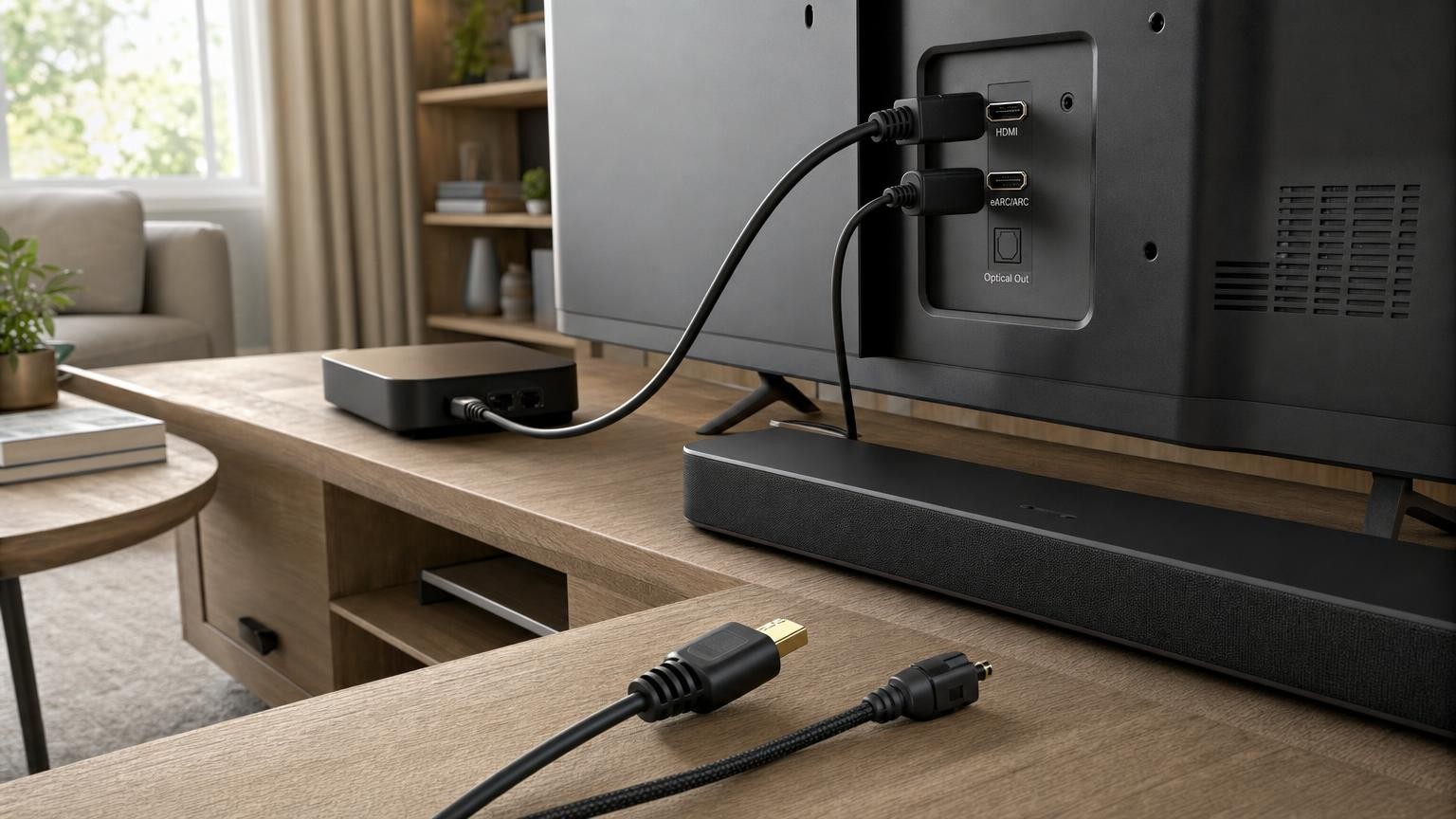
Connecting a soundbar is not simply a choice between three plugs. HDMI ARC, HDMI eARC and optical can differ in the audio signals they carry, the control features they enable and the way source devices are routed through a system. The connection can therefore affect whether you receive stereo, conventional surround sound, lossless audio or an object-based soundtrack.
The soundbar is only one part of the chain. The television, source device, streaming app, content, cable and audio settings must all support a feature for it to work. Understanding that chain is more useful than choosing a soundbar from one format logo on its specification sheet.
Why the connection can change what a soundbar delivers
A television may receive sound from its own apps, tuner or devices such as a games console, streaming player or disc player. It then either decodes that sound itself or sends it onwards to the soundbar. ARC, eARC and optical provide different routes for that final step.
Bandwidth is one important difference. Higher-bandwidth connections can transport more audio data, including formats that contain more channels or use lossless encoding. Control is another: an HDMI connection may allow compatible devices to coordinate volume and power, whereas optical is principally an audio connection.
None of this guarantees a dramatic audible difference in every room. A stereo programme will remain stereo unless a device applies processing, and a compact soundbar may handle an advanced soundtrack differently from a larger system with separate speakers. The connection establishes what can reach the soundbar; it does not determine how effectively the soundbar reproduces it.
ARC, eARC and optical: the practical differences
HDMI ARC
Audio Return Channel, or ARC, allows a compatible HDMI port on a television to send audio back to a soundbar or receiver. This return path means one HDMI cable can carry sound from the TV while also supporting related HDMI functions.
ARC commonly handles stereo PCM and compressed multichannel audio. It can be sufficient for everyday television, many streaming services and conventional surround formats. Its available bandwidth is lower than eARC, however, so it is not the usual route for uncompressed multichannel PCM or the highest-bandwidth lossless formats. Exact support still depends on both connected devices.
HDMI eARC
Enhanced Audio Return Channel performs the same basic role but offers substantially more audio bandwidth. With compatible equipment, it can carry signals such as multichannel PCM and lossless multichannel bitstreams that ordinary ARC cannot normally transport.
eARC is especially relevant when a system includes capable games consoles, disc players or other sources that can produce high-bandwidth audio. It can also offer more robust audio-link management, although day-to-day reliability still depends on device implementation, settings and firmware.
Both endpoints need to support eARC to obtain its full benefits. Connecting an eARC soundbar to an ARC-only television generally leaves the system operating within the television’s ARC capabilities.
Optical digital audio
Optical, often labelled digital audio out or TOSLINK, sends audio as light through a dedicated cable. It is widely useful with older televisions and sound systems, and it avoids some of the device-negotiation complexity associated with HDMI.
Optical commonly supports stereo PCM and certain compressed surround signals. It does not have enough bandwidth for lossless multichannel formats or uncompressed multichannel PCM. Format support can also vary, so a television and soundbar must recognise the same compressed signal.
Optical is not automatically poor quality. For stereo PCM or a supported compressed soundtrack, it may provide exactly the required signal. Its main limitations concern advanced formats, bandwidth and integrated device control rather than the fact that it is optical.
Audio formats, channels and the bandwidth bottleneck
Audio may travel as PCM or as a bitstream. PCM means the audio has already been decoded into channel data. A bitstream leaves the receiving device, such as the soundbar, to decode the selected format.
Stereo PCM contains two channels and fits comfortably through ARC, eARC or optical. Uncompressed multichannel PCM carries several channels separately and requires more bandwidth, making eARC the relevant return connection. A source device set to PCM may therefore produce stereo through ARC or optical even if its original soundtrack contained surround sound.
Bitstream audio can use compression to fit several channels into a smaller data rate. This is why ARC and optical can carry some multichannel surround formats despite their limits. Lossless multichannel bitstreams retain more audio data and generally require the additional capacity of eARC when travelling back from a TV.
Object-based audio adds positioning information that compatible equipment uses during playback. Such audio can be distributed using different underlying formats, including compressed and lossless variants. Consequently, seeing an object-based format named in a soundbar specification does not reveal whether a particular television app, source and connection can deliver every version of it.
The number of channels advertised for a soundbar also does not guarantee that every input accepts an equivalent signal. The soundbar may create virtual effects from stereo, expand a conventional surround signal or render a supported object-based mix. These are different processes and should not be treated as interchangeable.
The television is part of the audio chain
A TV can pass an incoming audio signal through unchanged, decode it and output another form, or downmix it to fewer channels. The result depends on the model, input, app and selected output mode. A television might support a format in one context but not pass the same format from an external HDMI source.
Settings labelled passthrough, bitstream, auto, PCM or digital audio output influence this behaviour. Passthrough usually aims to preserve a compatible incoming signal for the soundbar, while PCM asks one device in the chain to decode it. Labels and exact behaviour vary between manufacturers.
Built-in TV apps follow a shorter route than external devices but are still limited by the app’s available soundtrack, the TV’s format support and the return connection. External sources add another set of output settings. A console set to stereo PCM, for example, cannot provide discrete surround merely because the soundbar supports it.
Direct connection or routing everything through the TV?
The simplest arrangement is often to connect source devices to the television and use ARC or eARC for all sound. The TV acts as the central switch, and changing its input changes both picture and audio. This also avoids needing multiple HDMI inputs on the soundbar.
This arrangement works best when the television can pass all required audio formats. If it converts a signal, limits an input to stereo or cannot pass a desired lossless format, connecting the source directly to a soundbar HDMI input may preserve the audio.
A direct connection introduces different checks. The soundbar must pass the required video signal to the television, including any resolution, refresh-rate, high dynamic range or gaming feature in use. A soundbar that handles the desired audio format might still lack a particular video-passthrough capability. Available HDMI inputs can also be limited.
For gaming systems, routing a console straight to a suitable TV input may be preferable when advanced video features matter, with eARC returning the sound. For a disc player, a direct soundbar connection may be useful if the television cannot pass the player’s highest-quality audio. The right topology depends on both audio and video requirements.
Control features: HDMI-CEC is not the same as ARC
ARC and eARC transport audio back from the television. HDMI Consumer Electronics Control, or HDMI-CEC, carries control commands between compatible devices. CEC may allow the TV remote to adjust soundbar volume, or let the television and soundbar turn on and off together.
The two features are related in many real setups but are not identical. CEC often needs to be enabled for convenient ARC operation, yet a device can support CEC functions without supporting audio return. Manufacturers also use their own names for CEC, which can make the relevant menu difficult to identify.
Optical does not carry HDMI-CEC commands. Volume may instead require the soundbar remote, a programmable remote, infrared learning or another control arrangement supported by the equipment. Some televisions can vary their optical output while others provide a fixed-level digital signal, so this should not be assumed.
Cables, ports and settings that must line up
A reliable setup starts with the complete path rather than one device:
- Use the labelled ports. The television cable must connect to its ARC or eARC HDMI port and the corresponding TV or eARC connection on the soundbar.
- Select the soundbar output. Choose the television’s external speaker, audio system, ARC or optical option as appropriate.
- Check CEC. Enable the manufacturer’s HDMI-control setting if ARC operation or shared control requires it.
- Review audio output. Passthrough or bitstream may be needed for supported surround formats, while PCM can be appropriate for stereo or certain device arrangements.
- Check every endpoint. eARC requires compatible TV and soundbar ports. An adapter or cable cannot add eARC processing to an ARC-only device.
- Use a suitable cable. Choose a properly made HDMI cable specified for the video, data and eARC features the system requires. Optical cables should be seated fully and not bent sharply.
After changing settings, it can help to restart connected devices so that HDMI equipment negotiates the connection again. Firmware updates may also resolve known compatibility issues, but settings should be recorded before changing or resetting anything.
Common symptoms and what they usually indicate
Only stereo is reaching the soundbar
Check the source’s output mode, the television’s digital audio setting and whether the selected app or programme actually provides surround audio. A PCM setting on an ARC or optical path may result in two-channel output, while a TV that cannot pass the source format may downmix it.
Surround works in an app but not from a console
This often points to different handling of internal apps and HDMI inputs. Review the console format, TV input settings and the television’s passthrough capabilities. If necessary, compare direct connection with routing through the TV.
There is no sound
Confirm the labelled ports, selected TV output and soundbar input. For HDMI, check CEC and ARC or eARC settings. For optical, remove any protective caps and ensure the plugs are fully inserted. A power restart can clear a failed HDMI handshake.
Sound is delayed
Audio processing by the source, television or soundbar can add delay. Try the available lip-sync adjustment and avoid applying unnecessary processing at several stages. Direct and TV-routed connections may produce different timing.
Volume or power control is unreliable
This is generally a CEC or remote-control issue rather than an audio-format limitation. Check HDMI control on each device, simplify the HDMI chain and restart the system. With optical, confirm which remote or infrared method is intended to control volume.
Choosing the connection that matches the system
Optical remains practical for straightforward stereo, supported compressed surround or legacy equipment, particularly when integrated HDMI control is unimportant. ARC covers many conventional TV-and-soundbar uses and can combine compatible multichannel audio with convenient control through one HDMI connection.
eARC matters most when higher-bandwidth audio is part of the plan, including multichannel PCM or lossless formats from capable sources. It is also useful when source devices need to stay connected directly to a television for advanced video features.
Before buying, compare the entire signal path: the source’s output, the TV’s input and passthrough support, the return port, the soundbar’s accepted formats and any required video passthrough. A headline format logo describes only one link. The best connection is the one that preserves the audio and video features you actually use while keeping control and switching manageable.