


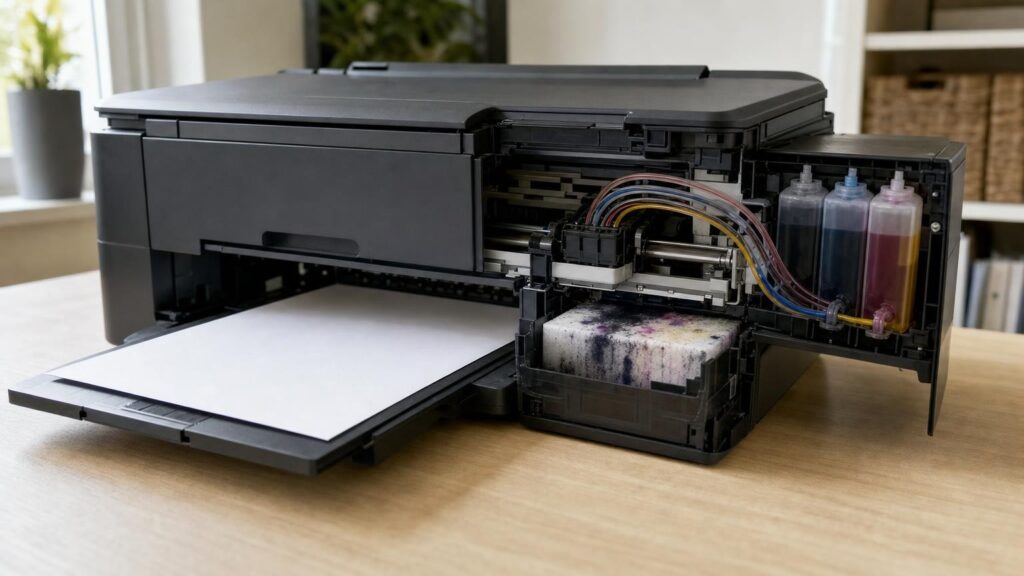
An inkjet printer does not use ink only when it puts words or images on paper. Ink may also be needed to fill the delivery system, keep printhead nozzles ready, clear restricted flow and protect the printhead while the printer is idle. Some of that ink ends up in an internal waste system rather than on a page.
This helps explain why an ink level can fall faster than a simple page count suggests. For shoppers, the important question is not merely how much ink a cartridge or bottle contains. It is how the printer manages that ink across setup, routine printing, idle periods and maintenance.
Why an inkjet printer can use ink without producing a page
An inkjet printhead contains very small nozzles that must deliver controlled droplets. For those nozzles to work reliably, ink needs to reach them without disruptive air gaps, excessive drying or contamination. The printer may therefore move ink through the printhead even when it is not completing a normal print job.
Non-printing consumption can occur during initial setup, automatic maintenance, manual cleaning or preparation after certain cartridge changes. A cancelled print, failed paper feed or cleaning operation may also use ink without adding a finished page to the output tray.
This does not mean all unexplained ink loss is normal. Leaks, incorrect installation and faults require investigation. However, a difference between the number of pages printed and the indicated ink remaining is not, by itself, evidence of a defect.
The ink path: from cartridge or tank to the printhead
Ink begins in a cartridge or refillable reservoir and travels towards the printhead. In a compact cartridge design, the printhead may be integrated into the cartridge itself. Other printers use a printhead that remains in the machine while cartridges or tanks supply it through internal channels or tubing.
An integrated-printhead cartridge replaces important nozzle components whenever the cartridge is changed. This can simplify recovery from some print-quality problems because a fresh cartridge brings a fresh set of nozzles, but it can also make each replacement cartridge more expensive.
A printer with a permanent or semi-permanent printhead separates the ink supply from the nozzles. Replacement cartridges or bottles can therefore be simpler containers, but the condition of the printer’s own printhead becomes more important. If ink dries in it or flow is interrupted, cleaning may consume ink. A problem that cleaning cannot resolve may require further maintenance or service.
Refillable-tank printers usually hold substantially more accessible ink than small-cartridge systems, but the ink still has to travel from each tank to the printhead. Tubes and internal chambers need to remain filled, or primed, so that the nozzles receive a consistent supply.
Priming and initial setup consumption
A new printer may need to draw ink into previously empty internal passages. This setup process can fill tubing, dampers, printhead chambers and nozzles before normal printing begins. A newly installed printhead or a refilled system that has admitted air may require a similar operation.
Consequently, a tank level can visibly drop during installation even though few or no pages have been printed. Likewise, supplied setup cartridges may appear to deliver fewer finished pages than a later replacement set because some of their ink prepared the printer’s internal system.
Shoppers should distinguish three different quantities: the physical contents of a cartridge or bottle, the amount needed to establish and maintain ink flow, and the amount ultimately placed on printed pages. They are related, but they are not interchangeable. Product documentation may explain whether included ink is intended partly for setup and whether quoted yields apply to replacement supplies rather than the starter ink.
What happens during nozzle checks and cleaning cycles
Nozzle checks
A nozzle check normally prints a small test pattern. Missing lines, gaps or incorrect colours help identify which nozzles are not firing properly. It uses some ink, but its main purpose is diagnosis rather than intensive cleaning. Running this test first can prevent unnecessary cleaning cycles.
Routine and standard cleaning
Printers may perform brief automatic maintenance at startup, shutdown or after a period of inactivity. The exact behaviour varies by model. A user-selected standard cleaning is more deliberate: the printer typically draws or ejects ink through the printhead to restore flow. That ink is collected rather than transferred to a normal document.
Deep cleaning
A deep, intensive or power-cleaning function generally moves more ink than an ordinary cleaning cycle. It may help when standard cleaning cannot clear a persistent restriction, but it is not a cost-free reset. Repeating it immediately can consume considerable ink and fill the waste system without resolving the underlying cause.
Cleaning also has diminishing value when the problem is not dried ink. An empty colour, a cartridge that is not venting correctly, air in a tank printer’s ink path, an incorrectly seated component or a damaged printhead may need a different response. The printer’s instructions should guide the sequence, including any recommended waiting period between cleaning attempts.
Where maintenance ink ends up
During cleaning, the printhead commonly moves to a service area. A capping station seals against it to limit drying while it is parked, and a purge or pump mechanism may draw ink through the nozzles. Wipers can remove residue from the printhead surface.
The expelled ink then needs somewhere to go. Depending on the design, it may be absorbed by internal pads or directed into a maintenance box, waste-ink container or similar replaceable component. These parts prevent loose ink from accumulating inside the working areas of the printer.
A user-replaceable maintenance box can make this aspect of ownership more predictable because the owner can usually obtain and fit the specified replacement. In other printers, absorbent pads are internal service components. When the printer estimates that they have reached their limit, professional attention may be needed. The arrangement, accessibility and replacement procedure are model-specific, so shoppers should not assume that every printer has a replaceable box or that every internal pad can be serviced economically.
Why advertised page yield is not every owner’s result
Page-yield figures are useful for comparing supplies only when their test basis is understood. Standardised testing uses defined documents, page coverage and operating conditions. Real households and offices may print very different material and may interrupt printing for days or weeks.
A yield figure is not simply cartridge capacity divided by an identical dose of ink per page. A short letter with sparse text uses less ink than a full-page presentation, photograph or graphic. Borderless printing can also require ink beyond the trimmed page area, while cleaning and setup may consume ink without creating saleable or usable output.
Test conditions may involve relatively continuous printing, which can spread maintenance consumption across many pages. An owner who prints one page occasionally may experience a larger maintenance cost per finished page, even if the printer is operating as designed.
Colour use is also uneven. A document described as colour does not necessarily use cyan, magenta, yellow and black equally. Photographs and branded graphics can deplete one colour first. If a printer requires that colour to be available for certain operations, the remaining ink in other cartridges does not automatically translate into more complete pages.
Cartridge and refillable-tank models: different cost trade-offs
Small cartridges make maintenance consumption highly visible because a modest cleaning cycle represents a noticeable share of the installed supply. High-capacity cartridge options may reduce replacement frequency where available, but buyers should check cost, stated yield and compatibility with the exact printer.
Refillable-tank models spread setup and maintenance consumption across a larger ink supply. This can suit regular or higher-volume printing, yet it does not eliminate priming, cleaning or waste-ink storage. Buyers also need to be comfortable filling tanks, matching bottles to the correct colours and following the specified procedure to avoid spills or air entering the system.
The permanent-printhead design common to many tank systems changes the risk rather than removing it. Economical bottles can be attractive for frequent printing, while very infrequent users should consider how long idle periods fit the model’s maintenance needs. Cartridge printers may have higher supply costs, but a cartridge with an integrated printhead can provide a straightforward replacement path for certain nozzle problems.
Neither architecture is automatically cheaper or more reliable for every owner. Purchase price, volume, printing regularity, replacement supply cost and possible service requirements all matter.
How printing frequency and document mix affect ownership
Regular printing can help keep ink moving through the nozzles, although printing unnecessary pages solely to exercise a printer also consumes supplies. Long idle periods may allow ink at exposed nozzle surfaces to thicken or dry, increasing the chance that maintenance will be needed when printing resumes.
Frequent power cycling can trigger checks or maintenance on some models. Conversely, leaving a printer continuously powered may use electricity and is not universally the correct strategy. Power behaviour differs, so owners should follow the manufacturer’s guidance and use the printer’s proper power button rather than routinely disconnecting power while it is operating or parking the printhead.
Document mix matters just as much as frequency. Occasional monochrome letters create a different ownership pattern from borderless photographs, school projects, marketing sheets or colour-heavy presentations. Some printers may use colour inks in particular quality modes or maintenance routines even when the visible document appears mainly black. Buyers who need photos should assess photo quality and ink configuration, while text-focused users should prioritise suitable document performance and supply economics.
What shoppers should check before choosing an inkjet
- Printhead design: Find out whether the printhead is built into each cartridge or remains in the printer, and what that means for replacement and servicing.
- Included ink: Check whether the box contains setup supplies, standard cartridges or full bottles, and whether some included ink is allocated to priming.
- Yield basis: Compare like with like, including standard and high-capacity supplies, while remembering that yield is based on defined test pages.
- Waste-ink system: Look for a user-replaceable maintenance box or information about how internal waste-ink components are handled.
- Maintenance procedure: Review nozzle-check, cleaning and deep-cleaning instructions before a problem occurs.
- Expected routine: Match the printer to realistic monthly volume, gaps between jobs and the balance of text, graphics and photos.
- Tank arrangement: For refillable models, consider bottle handling, individual colours, visible level markings and the setup process.
- Supply availability: Check the exact cartridge or bottle codes and whether suitable capacities are readily obtainable in the intended marketplace.
Choose around total ink behaviour, not just headline yield
A headline page yield is best treated as a comparison tool, not a promise of an individual owner’s cost per page. The practical result depends on how much ink reaches documents, how much is used to prepare and maintain the printhead, and how often the printer sits idle or performs short, interrupted jobs.
For a sound buying decision, balance the printer price against realistic print volume, document coverage, colour and photo needs, replacement supply costs, tolerance for maintenance and the accessibility of waste-ink components. Understanding the entire ink path makes it easier to choose between cartridges and tanks without assuming that every drop must appear on a finished page.
Continue exploring on Frowse
Discover More Frowse Insights
- What to Look for in a Robot Vacuum for a Singapore Apartment
- Why Hair-Dryer Wattage Does Not Tell You How Fast It Will Dry
- Inside a Duvet: How Fill and Construction Determine Warmth
- Why Paper Weight Alone Cannot Tell You How Printer Paper Will Perform
- Why Stainless-Steel Cutlery Can Still Rust, Stain and Bend