





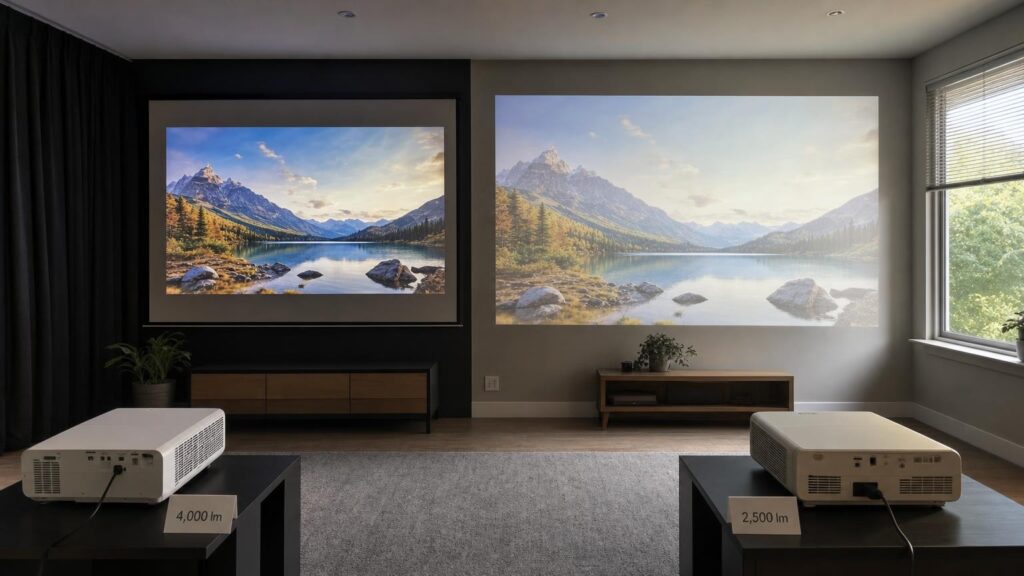
A projector’s lumens rating is often treated as a simple measure of picture quality: the bigger the number, the brighter and better the image. In practice, it is only a starting point. The rating describes light output under particular test conditions, not the brightness, colour or contrast you will necessarily see after installing the projector in your room.
Picture mode, image size, lens position, screen material and ambient light all affect the result. A projector with a lower headline figure can therefore produce a more convincing picture than a model advertising more lumens, particularly if its useful viewing modes retain accurate colour and contrast. The important question is not simply how much light a projector can produce, but how much usable light reaches the screen in your intended setup.
What a projector’s lumens rating actually measures
A lumen is a unit of luminous flux – the total quantity of visible light emitted by a source. For projectors, a properly reported lumen measurement is intended to indicate the light output produced across the projected image. It does not directly state how bright each part of your screen will appear from your seat.
That distinction matters because on-screen brightness depends on how the available light is distributed. The same amount of light can produce a bright small image or a much dimmer large one. Lumens describe output from the projector, while screen luminance describes the light reflected towards viewers from a particular image area and screen surface.
Comparisons also depend on the measurement method. A figure derived from a recognised, documented procedure is more useful than a label such as “light-source lumens”, “LED lumens” or another proprietary brightness term that cannot be compared directly. Even when two products use the same unit, the figures may have been recorded in different picture modes, colour-temperature settings or lens positions.
Before comparing numbers, check whether the manufacturer or an independent reviewer explains the method, operating mode and setup. Without that context, apparent precision does not guarantee a meaningful comparison.
Why the brightest preset may not be the mode you want to watch
A projector commonly offers several picture modes for different environments and types of content. Its maximum lumen claim may come from the most aggressive high-output setting rather than the cinema, film or accurate mode you are likely to use.
A maximum-brightness preset can change colour balance, gamma and contrast to extract more measured light. Whites may take on a green, blue or otherwise unnatural tint, skin tones can look less convincing, and subtle differences in bright or dark areas may be harder to see. The projector may also run its light source or cooling system more aggressively, resulting in more fan noise.
By comparison, a well-adjusted cinema-oriented mode may measure fewer lumens but deliver more balanced colour, better tonal detail and a picture that is easier to watch. Calibration can reduce output further because adjustments are being made for accuracy rather than maximum meter readings.
Look for mode-specific measurements where possible. A headline figure tells you what the projector can produce in one set of circumstances; output measured in a genuinely usable mode is a better indication of the experience you may get at home.
White brightness and colour brightness are not always equivalent
Projectors do not all create white and coloured images in the same way. Their imaging systems, light sources and internal processing can lead to different relationships between measured white output and the brightness of red, green and blue content.
A projector can perform strongly with a white test pattern without rendering saturated colours at a similarly convincing intensity. This is important because films, games, sport and photographs contain complex mixtures of colour rather than large areas of pure white. A presentation containing white slides may also look acceptably bright while colourful charts and images appear less vivid.
This does not mean that one imaging technology is automatically best in every situation. It means shoppers should avoid using a white-light figure as a complete description of colour performance. Independent evaluations of colour output, accuracy and gamut can add context, especially when comparing projectors with different imaging or light-source designs.
Screen size turns light output into image brightness
Projector light must cover the entire image area. Increase the picture size and the same total light is spread more thinly, reducing luminance at the screen. Because image area grows rapidly as both width and height increase, what appears to be a modest increase in diagonal size can have a substantial effect on brightness.
This is why a lumens rating is incomplete without an intended screen size. A compact image may remain clear in moderately challenging conditions, while a much larger image from the same projector may require stronger control of room light. Large-screen ambitions should therefore influence the brightness requirement from the beginning rather than being treated as a later installation choice.
When reading reviews, check the image size used during testing. A judgement that a projector is “bright” may be valid for the reviewer’s setup but not for a considerably larger screen.
Throw distance, zoom and installation can change usable light
Throw distance is the distance between the projector’s lens and the screen. A projector’s throw ratio and zoom range determine which image sizes it can create from a given position. These are primarily installation characteristics, but the lens configuration can also affect how much light reaches the screen.
With an optical zoom lens, different zoom positions may transmit different amounts of light. Lens shift and other optical adjustments can also introduce trade-offs, while poor alignment may force the use of digital keystone correction. Keystone correction reshapes the image electronically, reducing the number of pixels used for the visible picture and potentially softening detail. It does not improve underlying optical brightness.
Moving a projector closer should not be assumed to make a fixed-size image brighter. To preserve that image size, the lens must support the required throw and zoom setting. Any brightness difference is related to the optical setup, not simply the shorter distance through the air.
Check the manufacturer’s throw calculator or installation information before buying. Confirm that the desired image size is available from your mounting position without relying heavily on digital correction.
How screen gain changes brightness, viewing angles and uniformity
Screen gain describes how a projection surface reflects light relative to a standard reference surface. A higher-gain screen directs more light towards particular viewing positions, potentially creating a brighter image for viewers seated in its preferred area. It does not create additional projector output.
This directionality introduces trade-offs. A higher-gain surface can have narrower viewing angles, so people seated away from the centre may see a dimmer or less even image. Some screens can produce a visible hot spot, where one part of the picture appears brighter than the rest. Projector position and seating layout therefore matter as much as the gain figure.
Lower-gain surfaces may sacrifice some peak brightness but can support wider seating positions or help manage reflections in a dark room. Ambient-light-rejecting screens use structured surfaces intended to reflect light from the projector while redirecting certain light arriving from other directions. Their effectiveness depends on the projector’s placement, the direction of unwanted light and the geometry of the room. They are not a universal substitute for controlling light.
Choose a screen as part of the projection system rather than as a neutral backdrop. Gain, viewing angle, projector position and room layout need to work together.
Ambient light and contrast determine whether the image looks washed out
Ambient light falling on the screen raises the visible black level. Projectors create dark areas largely by sending less light to those parts of the image, so they cannot prevent room light from illuminating the screen. Once the screen is already brightened by a window or lamp, blacks look grey and shadow detail becomes harder to distinguish.
Additional projector output can make highlights and bright colours more visible, but it cannot fully restore deep blacks under strong ambient light. The resulting image may be brighter without gaining the contrast needed for depth and clarity.
Control the light that reaches the screen directly. Closing a blind opposite the screen or moving a lamp whose light strikes the projection surface may help more than reducing illumination elsewhere in the room. Darker walls and ceilings can also reduce reflected projector light from returning to the screen, although room decoration may not be practical to change.
Content affects the decision too. Bright presentations, casual television and sport can remain usable under conditions that make a dark film look flat. Competitive games may also require a picture mode that balances brightness and low input delay rather than maximising cinematic accuracy.
How to compare brightness claims before buying
A useful comparison starts with your room and desired image, not with the largest number on a specification sheet. Work through the following points:
- Check the measurement language. Prefer figures tied to a recognised method, and be cautious when a proprietary brightness label lacks a direct conversion or clear test procedure.
- Look for usable-mode output. Independent measurements in accurate, cinema or otherwise watchable modes provide more context than the maximum preset alone.
- Define the image size. Decide the approximate diagonal or image dimensions you want, because increasing area reduces on-screen luminance.
- Assess room light. Consider windows, lamps and reflections that will strike the screen during the hours when you normally watch.
- Include the screen. Screen gain, viewing angle and surface type can change perceived brightness and uniformity.
- Verify the throw range. Make sure the projector can create the intended image from the available position, including any effect of lens zoom and shift.
- Consider the content. Films in a dark room, daytime sport, games and presentation slides place different demands on brightness, contrast, colour and responsiveness.
- Balance secondary effects. A brighter operating mode may bring less accurate colour, weaker tonal balance, greater fan noise or different light-source behaviour.
Also distinguish native image quality from settings that merely make a specification look stronger. Dynamic light-source controls and processing may improve certain scenes, but they do not remove the need for adequate usable brightness and good room conditions.
Match the whole projection system to the room
A projector, lens setup, picture mode, screen and room operate as one system. Changing any part can alter the picture more than a modest difference in advertised lumens. This is why two projectors with similar ratings can look noticeably different, and why the same projector can be impressive in one room but disappointing in another.
The best buying target is not the highest lumen number. It is sufficient output in a picture mode you will actually use, at your chosen image size, with a suitable screen and realistic control of ambient light. Once that requirement is met, colour accuracy, contrast, noise, installation flexibility and content preferences become equally important to a convincing picture.
Continue exploring on Frowse
Discover More Frowse Insights
- Inside a Fishing Reel: What Drag, Gear Ratio and Spool Design Actually Change
- What “Solid Top” Really Means on an Acoustic Guitar
- Why a Paper Shredder’s Sheet Rating Tells Only Half the Story
- Pressure, Flow and Nozzles: What Really Determines How a Pressure Washer Cleans
- What Pouch Thickness, Roller Design and Temperature Change in a Laminator