


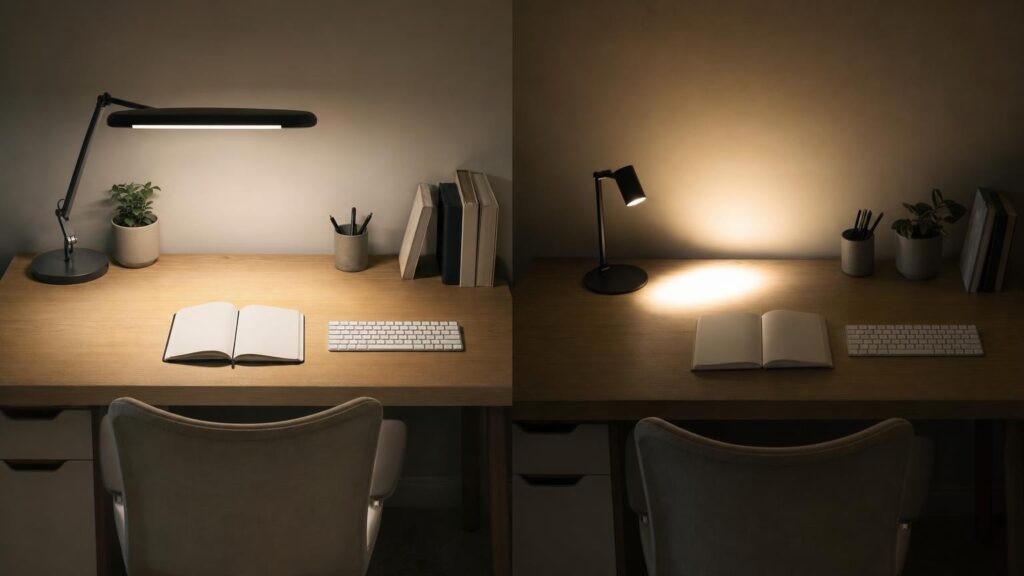
A desk lamp can have an impressive lumen rating and still be disappointing in use. Lumens describe the total quantity of visible light produced, but they do not reveal how much of that light reaches your notebook, keyboard or drawing surface. They also say nothing about whether the light is evenly distributed, creates distracting reflections or can be positioned where it is needed.
Two lamps with similar output can therefore perform very differently. One might direct most of its light into a useful pool on the desk, while another spreads light around the room or produces a small, intense hotspot. To judge a desk lamp properly, consider its physical geometry and light distribution alongside its headline output.
Lumens and illuminance measure different things
Lumens measure luminous flux – the total visible light emitted by a source. This is useful for comparing broad output, but it does not describe the destination of that light.
Illuminance measures the amount of light falling on a surface and is normally expressed in lux. In simplified terms, one lux is one lumen distributed over one square metre. That does not mean a lamp’s lumen figure can be converted directly into useful desk illuminance, because the light is rarely spread perfectly and not every emitted lumen reaches the work surface.
Distance and beam distribution make a substantial difference. A lamp that concentrates its output into a small area can create higher illuminance there than a higher-lumen lamp with a wide, uncontrolled spread. Move the same lamp farther from the desk and the light covers a larger area, but its intensity at the surface usually decreases.
Even a lux figure needs context. A measurement taken directly beneath the lamp head may describe the brightest point rather than the whole working area. A more informative specification states the measuring distance, the position of the reading and the area covered. Without that information, a large lux number can be as incomplete as a lumen rating.
Mounting height and arm reach change where the light lands
The relationship between lamp head and work surface determines both intensity and coverage. A low-mounted head can produce a bright, concentrated pool. This may suit close-detail work, but it can leave the rest of a large desk comparatively dark and may obstruct sightlines. Raising the head generally expands the illuminated area while reducing the intensity at any one point.
Horizontal reach matters just as much. A lamp mounted at the back or side of a deep desk needs enough reach to place the light over the task rather than merely lighting the rear edge. A tall lamp with little forward reach may appear flexible in photographs but still fail to illuminate the centre of the working area effectively.
Look beyond the overall height and consider:
- The maximum and minimum practical head height above the desk.
- How far the arm can extend horizontally without becoming unstable.
- Whether the joints allow the head to move independently of the arm.
- Whether adjustment requires moving the base or clamp.
- Whether the lamp holds its position when extended.
Adjustment range is especially valuable when a desk supports several activities. A low position may be useful for model-making or drawing, while a higher position can provide broader coverage for paperwork and computer use.
Shade geometry and beam spread shape the usable pool of light
A shade is not merely decorative. Its depth, aperture, internal surfaces and reflector shape influence where the light goes and whether the source is visible from a normal seated position.
A deep shade with a relatively narrow opening tends to contain the light and limit sideways spill. This can create a defined task area and reduce direct glare, but the pool may be too small for a wide desk. A shallow or open head may spread light more broadly, although it can expose the bright source to the user’s eyes.
Beam angle describes how widely a source distributes its light. A narrow beam can produce a bright centre but stronger differences between the illuminated zone and its surroundings. A broad beam covers more surface, yet the available output is spread across that larger area. Neither is automatically better. The right choice depends on whether the task requires concentrated detail lighting or more uniform coverage.
Also consider the beam’s shape. A round pool may suit a compact reading area, while a long linear head can distribute light across a keyboard, documents or a wider bench. Product photographs can suggest the shape, but camera exposure and bright surroundings may disguise hotspots and dark edges.
Diffusion improves uniformity but can reduce intensity
A diffuser sits between the light source and the user or work surface. It scatters light, helping to blend individual LEDs and soften abrupt transitions between bright and dark areas. A larger diffused emitting surface can also feel less harsh than a small, intensely bright source.
This treatment involves a trade-off. Diffusing material may absorb some light and redirects the remainder over a wider range of angles. As a result, a diffused lamp may deliver lower peak intensity than a tightly focused lamp with the same source output. However, it may provide more comfortable and useful coverage because there is less of a central hotspot.
When comparing lamps, do not assume the one with the brightest visible centre will be best for sustained work. Uniformity across the area occupied by a book, document or craft project can matter more than maximum brightness at one measurement point. Dimming is also more useful when it controls a well-distributed beam rather than merely reducing an already uneven hotspot.
Glare and shadows can undermine an otherwise bright lamp
Glare occurs when a bright source or reflection competes with the task for your attention. Direct glare may come from exposed LEDs or a bulb visible beneath a shallow shade. Shielding, a deeper head and a larger diffusing surface can reduce this problem, provided the lamp can still be aimed effectively.
Reflected glare is different. Light directed towards a glossy screen, coated paper or polished desk can bounce into the user’s eyes. A powerful lamp can make these reflections more distracting, not less. Head rotation and arm articulation help because they allow the angle of incidence to be changed without moving the entire lamp.
Placement also affects shadows. For handwriting and drawing, a right-handed user will often benefit from light arriving mainly from the left, while a left-handed user may prefer it from the right. This keeps the working hand from casting a strong shadow over the active area. A centrally positioned linear lamp can be another option if it spreads light around both hands without reflecting from a screen.
Ambient room lighting remains relevant. A very bright task pool surrounded by darkness creates a strong contrast whenever the user looks away from the desk. A desk lamp does not necessarily need to illuminate the whole room, but supplementary ambient light can make the overall environment feel more balanced.
Colour rendering, colour temperature and flicker are separate questions
Lighting terminology can make unrelated qualities seem interchangeable. Lumens, colour rendering, colour temperature and flicker describe different aspects of performance, and a strong result in one area does not guarantee a strong result in another.
Colour rendering
Colour rendering describes how faithfully colours appear under a light source compared with an appropriate reference. It can matter when distinguishing pens, paints, threads, components or printed details. A high-output lamp may still make some colours look muted or difficult to tell apart. If colour judgement matters to the task, look for meaningful colour-rendering information rather than treating brightness as a substitute.
Colour temperature
Correlated colour temperature describes whether white light appears warmer and more yellowish or cooler and more bluish. It is an appearance characteristic, not a direct measure of output or visual quality. Preferences vary with the task, time of day, surrounding lighting and room finishes.
Adjustable colour temperature can be useful when the same desk is used for different purposes, but it should not compensate for poor positioning or uneven distribution. Check whether brightness can also be adjusted at each colour setting, as controls and available output may behave differently across modes.
Flicker
LED brightness is controlled electronically, and some lamps may vary their output rapidly over time. The effect is not always visible, and a phone-camera demonstration is not a definitive test because camera settings can create or hide banding. Nevertheless, temporal stability is separate from lumen output. A bright lamp is not automatically a stable one.
If a manufacturer provides flicker information, assess how clearly the measurement conditions are explained. Vague labels such as “eye-friendly” do not replace details about light distribution, glare control, colour quality or electronic performance.
How to compare desk lamps when specifications are incomplete
Desk-lamp listings often provide lumens without giving useful illuminance maps or measurement conditions. In that situation, use a disciplined comparison rather than relying on the largest number.
- Map the desk. Note its depth, width and the position of the main task. Identify where a base or clamp can fit without taking valuable working space.
- Check working dimensions. Compare maximum height and horizontal reach with the distance between the mounting point and task area. Product dimensions are more informative than an image taken from an unknown angle.
- Inspect articulation. Look for arm movement, head tilt and head rotation. More joints are only beneficial if they support the positions you need and remain stable.
- Assess the light head. Consider whether it is compact and focused, broad and linear, deeply shielded or fitted with a diffuser. Relate that shape to the area you want to illuminate.
- Read light measurements carefully. If lux is stated, look for the distance, head position, brightness setting and measured area. A centre reading alone does not describe uniformity.
- Examine the controls. Several usable dimming levels can help adapt the lamp to ambient conditions. Check whether controls are accessible when the lamp is installed and whether settings can be adjusted independently.
- Treat photographs cautiously. Camera exposure, editing and room lighting can make a beam appear broader, smoother or brighter than it is.
Also consider practical mechanics. A heavy base consumes more desk area but may support a long reach. A clamp saves surface space, although it requires a compatible edge and enough clearance beneath the desk. Cables, shelves, monitors and wall position can all limit the movement shown in promotional images.
Match the lamp’s geometry to the desk and task
On a compact desk, control and shielding may matter more than maximum output. A lamp with a small footprint, moderate reach and well-contained beam can illuminate the task without shining into nearby eyes or walls. A clamp can free surface space if the desk edge can accommodate it securely.
A large work surface generally benefits from greater mounting height, longer reach or a wider light head. One broad lamp may improve uniformity, but a single source can still leave areas shaded by hands, equipment or storage. Depending on the layout, a repositionable lamp and ambient room light may be more practical than pursuing a very high lumen rating.
For screen-based work, prioritise positioning that avoids reflections and keeps the source outside the direct line of sight. A rotatable head is useful because the beam can be directed towards documents or the keyboard rather than the display. The lamp should also fit around monitor stands and shelves without forcing an awkward mounting location.
Close-detail tasks often benefit from higher illuminance over a smaller area, accurate placement and good colour rendering. A focused beam may be appropriate, but strong hotspots and hand shadows can conceal detail elsewhere. Frequent repositioning makes stable joints, smooth movement and accessible controls particularly important.
Conclusion: Judge the delivered light, not the headline number
Lumens are a useful starting point, but they cannot show how well a desk lamp will illuminate a real work surface. Mounting height, reach, shade geometry, beam spread and diffusion determine where the output goes and how evenly it is delivered. Glare, reflections and shadows can then change whether that light is comfortable and usable.
Start with the desk and task, then assess whether the lamp can place an appropriately shaped pool of light in the right location. Consider colour rendering, colour temperature and flicker separately rather than treating them as alternative brightness measures. The better choice is not necessarily the lamp with the largest lumen figure, but the one that distributes and controls its light effectively across the area where you work.
Continue exploring on Frowse
Discover More Frowse Insights
- AGM, EFB and Flooded Car Batteries: Why the Right Size Is Not Enough
- Why Replacement Zip Sliders Are So Difficult to Match
- Bypass, Anvil and Ratchet Secateurs: How to Choose the Right Cutting Mechanism
- What a Sleeping Mat’s R-Value Reveals – and What It Leaves Out
- Why a Washing Machine’s Kilogram Capacity Is Not the Size of Every Load