


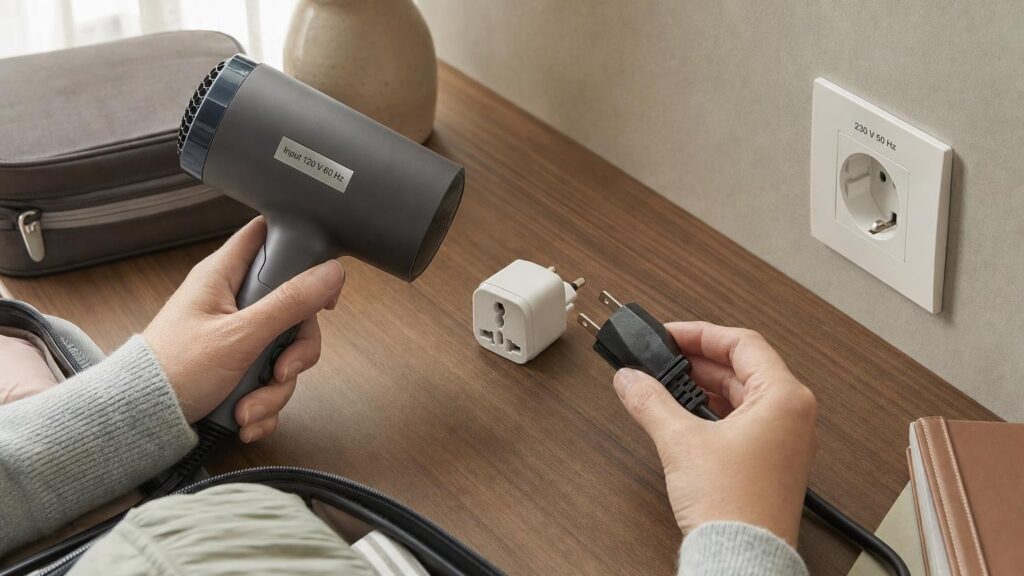
A travel plug adapter, a voltage converter and a USB charger perform different electrical jobs. Although one travel accessory may combine several functions, having one does not automatically provide the others.
A basic plug adapter changes the physical connection so that one plug format can fit another socket format. It normally passes through the electricity supplied by the destination socket without changing its voltage. A voltage converter changes one mains voltage to another, while a USB charger converts mains electricity into a low-voltage output for compatible USB-powered devices.
Understanding these distinctions helps prevent a common buying mistake: assuming that an appliance is electrically compatible simply because its plug fits into the adapter.
Plug Shape, Voltage and Frequency Are Separate Compatibility Checks
Before using an appliance abroad, check the socket format, mains voltage and mains frequency independently.
Socket format determines whether the pins physically fit and make the intended electrical connections. Destinations use different pin shapes, layouts, shutters and socket designs. This mechanical difference is the main problem a travel plug adapter solves.
Mains voltage is the voltage supplied by the wall socket. A standard plug adapter does not usually alter it. If the destination voltage falls outside the appliance’s accepted input range, changing the plug shape is not enough.
Mains frequency is measured in hertz, or Hz. Many electronic power supplies accept both 50 Hz and 60 Hz, but that capability should be confirmed on the label. Some clocks, motor-driven appliances and other frequency-dependent equipment may not operate as intended on an unsupported frequency even when the voltage is suitable.
A plug fitting into a socket therefore confirms only physical compatibility. It does not confirm voltage, frequency, grounding or power compatibility.
Read the Input Label Before Choosing an Adapter
The appliance, charger or external power supply should carry input information. Look for the word Input and read the complete voltage and frequency specification.
An input marked 100–240 V, 50/60 Hz indicates that the power supply is designed to accept electricity within those stated ranges. If the destination supply is within them, voltage conversion is not normally required. You may need only an appropriate plug adapter for the wall connection.
A label showing a single voltage or a narrow voltage range needs closer attention. If the destination supply is outside that specification, the appliance should not be treated as compatible merely because an adapter allows it to be plugged in.
Do not confuse input and output ratings. A laptop power supply might accept mains electricity across a wide input range before delivering a lower-voltage output to the computer. That output figure describes what the power supply sends to the device, not what the power supply can accept from the wall.
The same principle applies to USB chargers. Their labels may show mains input information followed by several USB output combinations. Check the mains input for destination compatibility, then assess whether the available USB output suits the connected device.
Country of purchase is not a reliable substitute for the label. Appliances bought in the same market can use different input ranges, and a replacement charger may have different specifications from the original one.
When an Adapter Is Enough – and When a Converter Is Needed
A plug adapter may be sufficient for a dual-voltage or wide-input device when its stated input range includes the destination’s voltage and frequency. This is common among electronic power supplies, but it should always be verified rather than assumed.
A single-voltage appliance may require voltage conversion when its input does not match the local supply. The direction of conversion matters. A step-down converter reduces a higher supply voltage to a lower voltage, while a step-up converter raises a lower supply voltage to a higher one. A converter designed for one direction should not be assumed to work in reverse.
The converter must also be suitable for the appliance’s power demand and operating characteristics. Matching voltage alone is not enough.
Heating appliances such as kettles, hair dryers and styling tools can demand considerably more power than phone chargers or laptop power supplies. Motor-driven appliances may have start-up demands or frequency requirements that make converter selection more complicated. Compact travel converters can therefore be unsuitable for some high-power or motorised equipment.
For these appliances, using a model designed for the destination supply may be more practical than carrying a large converter. If the input label and instructions do not clearly support the planned arrangement, do not rely on a plug adapter alone.
USB Charging Does Not Make the Mains Socket a Converter
Travel adapters with built-in USB ports contain two functions that should be evaluated separately. The USB charging section converts mains electricity into low-voltage DC power for its USB outputs. The adapter’s pass-through AC socket will usually continue to provide the destination’s native mains voltage.
This means a phone might charge correctly from the USB section while an incompatible appliance connected to the AC socket still receives the wrong voltage. Working USB ports are not evidence that the mains outlet provides voltage conversion.
USB connector shape is only one part of charging compatibility. USB-A and USB-C identify physical interfaces, but they do not by themselves establish charging power or support for a particular charging method. The charger’s output, the cable and the connected device all affect the result.
A device may charge more slowly when the charger and device do not share the same higher-power charging protocol. Some laptops and other demanding devices may require more output than an adapter’s built-in USB section can provide.
Multi-port charging also introduces shared limits. If several USB ports draw from one internal power supply, connecting an additional device may reduce the power available to the other ports. Check both per-port information and the stated combined output.
Grounded and Ungrounded Connections
Protective earth, also called ground, is separate from voltage compatibility. Equipment designed for a grounded connection needs a continuous earth path through the appliance plug, adapter and wall socket.
A three-pin opening on the front of an adapter does not prove that the adapter maintains grounding. Some adapters can physically accept a grounded plug but connect to the destination socket with only two pins. In that arrangement, there is no complete protective-earth path.
Check the whole connection rather than relying on appearance. The adapter’s internal design and destination-facing pins must support grounding, and the wall socket must provide the corresponding connection.
Two-pin, double-insulated equipment is designed differently from equipment that depends on protective earth. Do not remove, bypass or treat an earth pin as optional. If the appliance requires grounding, choose an adapter and destination socket arrangement explicitly specified to maintain it.
Fuses, Ratings and Other Limits That Adapters Do Not Remove
A built-in fuse can provide limited overcurrent protection under its specified conditions. It does not regulate voltage, change frequency, create a missing earth connection or make an incompatible appliance suitable for use.
The adapter itself has voltage, current and power limits. Compare these ratings with the destination supply and the connected equipment. Also check whether the instructions impose different limits for particular plug settings, outlets or combinations of use.
Several sockets do not necessarily represent several independent full-capacity circuits. AC outlets may share one overall input limit, while USB ports may share a separate charging limit. The combined load matters when multiple devices are connected at once.
Simple voltage and current calculations can help explain a load, but they may not account for start-up demand or other appliance characteristics. Use the equipment’s stated requirements and instructions rather than estimating from its size or purpose.
A fused adapter should therefore be treated as connection equipment with defined limits. Its fuse is not a substitute for checking voltage, frequency, grounding and total load.
The Practical Limits of Universal Travel Adapters
The term universal generally describes an adapter designed for several common plug formats. It does not guarantee compatibility with every socket variation, electrical supply or appliance.
Real-world socket designs may include recessed faces, shutters, different grounding arrangements and variations in pin dimensions. An adapter can support a general plug format yet still fit poorly in a deeply recessed or unusually shaped outlet.
Physical size matters too. Multi-format mechanisms tend to be bulkier than simple destination-specific adapters. The body may block a neighbouring outlet, while a heavy charger or cable can pull the adapter away from a loose or vertical socket.
Stacking adapters, power supplies and extension accessories adds weight, leverage and additional connection points. Even when every component has suitable electrical ratings, the arrangement may be awkward or mechanically unstable.
For travel to one known destination, a destination-specific adapter may offer a simpler fit. A multi-format design can be convenient for an itinerary involving several socket standards, but its supported formats, grounding arrangement, dimensions and electrical ratings still need to be checked.
A Pre-Travel Compatibility Checklist
- Identify each destination socket format. Include accommodation used during stopovers if devices will be connected there.
- Confirm the local electrical supply. Check mains voltage and frequency separately from plug shape.
- Inspect every input label. Read the appliance, removable charger and external power supply rather than relying on where the device was purchased.
- Separate AC and USB needs. Built-in USB charging may be suitable even though the adapter’s AC socket does not convert voltage.
- Check grounding requirements. Confirm that the complete path maintains protective earth where the appliance requires it.
- Assess the total load. Include every device that may be connected to shared AC outlets or USB ports at the same time.
- Select the correct equipment. You may need a plug adapter, a suitable device charger, a correctly specified voltage converter or an appliance made for the destination supply.
- Consider the physical setup. Account for recessed sockets, limited space, blocked neighbouring outlets and the weight of attached chargers or cables.
Match the Tool to the Electrical Job
No single travel accessory automatically solves plug shape, voltage, frequency, grounding and USB charging compatibility. Each is a separate part of the buying decision.
Begin with the destination’s socket and electrical supply, then read the input label on every device. Choose equipment whose plug support, ratings, grounding arrangement and charging capabilities match the intended use. A plug adapter can solve the physical connection, but it should never be mistaken for automatic voltage conversion.
Continue exploring on Frowse
Discover More Frowse Insights
- What Camera Sensor Size Changes – and What It Does Not
- What a Sleeping Mat’s R-Value Reveals – and What It Leaves Out
- What to Look for in a Robot Vacuum for a Singapore Apartment
- Why a Tent’s Waterproof Rating Is Only Part of Its Rain Protection
- Why Hand-Blender Wattage Does Not Predict Blending Performance