





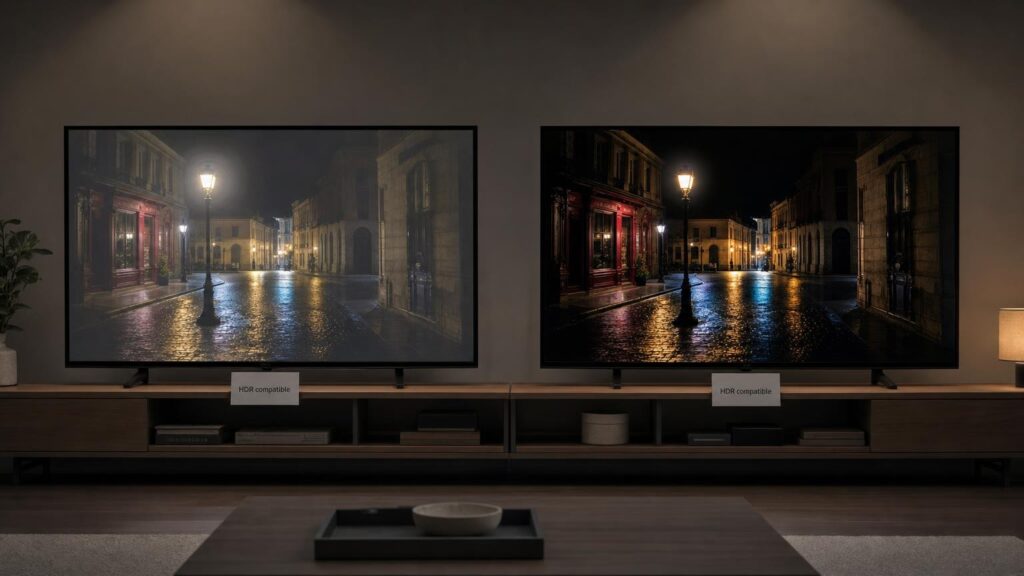
An HDR logo on a television can be useful, but it answers only a limited question. It may confirm that the TV can recognise and process a particular high dynamic range signal. It does not tell you whether the screen can produce bright, controlled highlights, convincing blacks, rich colours and visible shadow detail at the same time.
That distinction matters because HDR is not simply a format switched on by compatible content. It is a demanding way of presenting light, colour and contrast. Two televisions can accept the same HDR programme or game yet produce noticeably different pictures because their panels, backlights and image processing have different capabilities.
HDR compatibility versus HDR picture performance
An HDR picture travels through a chain. Content is mastered in an HDR format, a streaming service or playback device outputs the signal, the connection path carries it, and the television decodes and displays it. A compatibility badge usually relates to one or more signal-handling stages in that chain.
Once a television receives the signal, it still has to fit the content to the physical limits of its screen. No consumer display can reproduce every possible level of brightness and colour information found in every HDR production. The TV therefore interprets the signal and decides how to represent anything outside its capabilities.
A basic HDR-compatible television might decode the content correctly but have insufficient brightness, limited contrast or a restricted colour range. HDR may then look only slightly different from standard dynamic range, or it may appear dim and flat. A more capable display can use the same signal to create brighter reflections, more distinct points of light, deeper dark areas and stronger separation between objects.
Compatibility is therefore a starting point. Picture performance depends on what the television can physically display and how intelligently it adapts the source.
Brightness matters, but not as a single headline number
HDR uses brightness selectively. Sunlight glinting from metal, sparks, stars and illuminated signs can appear significantly brighter than their surroundings, creating a sense of depth and realism. This is known as specular highlight impact, and it is one reason peak brightness receives so much attention.
However, a single peak-brightness figure is not a complete description of performance. A television may achieve its highest output only in a small area, for a short time or in a particularly aggressive picture mode. It may be less bright when a larger portion of the screen is illuminated, as happens with snowfields, daylight sports, clouds or bright animated scenes.
Sustained brightness also matters. Some displays reduce output as a bright scene continues, whether to manage heat, energy consumption or panel behaviour. Others may keep highlights bright but lower the rest of the image. The subjective result depends on how smoothly these changes happen and whether they distract from the content.
Consider both highlight capability and full-scene behaviour. A high maximum figure can be valuable, but it should be interpreted alongside measurements at different image sizes and observations of real content. Room conditions matter too: a moderate output may be persuasive in a dark room but struggle against daylight and reflections.
Black level and contrast create the foundation
HDR is about range rather than brightness alone. A highlight looks more intense when it sits beside a genuinely dark area. If blacks appear grey or the whole image is raised to make details visible, the picture can lose depth even when the display is capable of substantial brightness.
Different display technologies approach black reproduction differently. Emissive displays control light at or near the individual-pixel level, allowing dark pixels to remain off while nearby pixels produce light. This can deliver precise contrast and clean dark scenes, although brightness behaviour and near-black processing still vary between televisions.
Backlit displays generate light behind a liquid-crystal layer. They can offer strong brightness, but must prevent that backlight from leaking into areas intended to be dark. Their performance depends heavily on panel characteristics, the backlight design and the effectiveness of local dimming.
Neither approach should be treated as universally superior. A shopper choosing for daytime viewing may value high brightness and reflection handling, while someone watching films in a dark room may place greater emphasis on deep blacks and subtle shadow detail. Viewing angle can also alter perceived contrast, especially for people sitting away from the centre of the screen.
Local dimming: control matters as much as power
Local dimming allows a backlit television to adjust different sections of its backlight independently. In principle, it can illuminate a bright object while reducing light behind darker parts of the scene. In practice, the result depends on both the number and arrangement of controlled areas and the processing used to manage them.
When a bright object is smaller than a dimming area, unwanted light can spill into the surrounding darkness. This is often visible as blooming or a halo around subtitles, stars or lamps. A television may suppress blooming by dimming the bright object, but that reduces highlight impact. It may instead prioritise brightness, making the halo more visible.
Overly forceful dimming can also hide faint details in shadows, a problem commonly described as black crush. Slow or unstable control may cause brightness to change as objects move, while subtitles can make large areas of the picture pulse.
The words local dimming on a specification sheet therefore reveal little by themselves. Effective systems balance black level, highlight brightness, detail and consistency. Independent evaluations using moving scenes are generally more informative than the mere presence of the feature.
Colour gamut, colour volume and panel limitations
HDR commonly accompanies a wider range of reproducible colours, but there are two related ideas to understand. Colour gamut describes the range of hues a display can produce under defined conditions. Colour volume also considers brightness, asking whether those colours remain saturated as their luminance increases.
This distinction is important because an intense red sign, a bright green landscape or a vivid blue light should not simply turn pale as it becomes brighter. A television may cover a broad colour gamut at moderate levels yet lose saturation in high-brightness areas. Another may retain strong colour but lack enough overall light output to give the scene the intended impact.
Panel structure, colour filters, light source and image processing all affect the result. When content asks for colours or brightness beyond the display’s capabilities, the television must compress, clip or alter that information. Poor handling can make subtle shades merge together or cause bright colours to look washed out.
Wide-colour claims are consequently more useful when supported by measurements of colour at different brightness levels. Accuracy matters as well: highly saturated colour is not automatically faithful colour.
Tone mapping and the choices a television makes
HDR content can contain highlights and colours that exceed what a particular television can reproduce. Tone mapping is the process used to fit that information within the screen’s limits. It involves choices rather than a simple conversion.
A television might preserve bright highlight detail by lowering the brightness of the overall image. Alternatively, it might keep the main scene bright but clip the most intense details, causing texture in clouds, lamps or reflections to disappear. It may also raise shadows for visibility, potentially weakening blacks, or keep them dark at the risk of concealing subtle detail.
These decisions help explain why televisions with superficially similar hardware can look different. Processing can affect contrast, colour, facial tones and the smoothness of transitions. Picture modes may make different compromises: a more accurate mode may prioritise the source’s intended balance, while a vivid mode may emphasise brightness and colour at the expense of nuance.
Some televisions also alter their tone mapping in response to room light. This can be useful during daytime viewing, when strict dark-room presentation might be difficult to see, but it changes the image. Shoppers should consider whether such processing can be adjusted and whether it behaves consistently.
HDR formats, metadata and source compatibility
HDR formats can use static or dynamic metadata. Static metadata supplies general information that applies across a programme or film. Dynamic metadata can provide guidance that changes by scene or frame, potentially helping a compatible television adapt its tone mapping more precisely.
Dynamic metadata is not a guarantee of a superior image. Its value depends on the content, implementation and display hardware. A television with excellent contrast, colour and processing may produce a more convincing picture from a basic compatible signal than a weak screen receiving a more advanced format.
Support must also align throughout the playback chain. The content needs to be available in the format, the app or player must output it, any intermediate audio or switching equipment must pass it correctly, and the television must recognise it on the relevant input. Connection settings can sometimes affect whether the expected signal is received.
Broader format support reduces the chance of falling back to another presentation, particularly for viewers who use several services or disc sources. It cannot compensate for poor black levels, inadequate brightness or limited colour volume.
How to assess HDR capability before buying
Start by separating compatibility from performance. Confirm support for the formats used by your preferred sources, then assess the display itself. Useful areas to investigate include:
- Brightness behaviour: Look for independently measured output in small highlights and larger bright scenes, including whether brightness can be sustained.
- Black level and contrast: Consider performance in both dark and mixed scenes, not just a full black test image.
- Local dimming: For backlit models, examine blooming, shadow detail and stability with moving objects and subtitles.
- Colour performance: Look beyond a wide-gamut label to colour volume, accuracy and saturation at higher brightness.
- Tone mapping: Check whether highlights retain detail without making the overall picture unnecessarily dim.
- Viewing environment: Match brightness, screen finish and reflection control to the amount of ambient light in your room.
- Viewing position: If several people watch from different seats, investigate how contrast and colour change off-axis.
- Picture controls: Useful modes and adjustable processing can help the TV suit films, sport, games and different room conditions.
When comparing televisions in person, be cautious with vivid shop modes and specially prepared demonstration footage. These can favour intense colour and brief highlights rather than natural faces, difficult dark scenes or sustained brightness. If possible, evaluate a mixture of daylight scenes, night sequences, skin tones, subtitles, moving points of light and colourful objects.
Specifications and demonstrations are most helpful when interpreted together. Measurements describe capabilities under controlled conditions, while varied real scenes reveal whether the television uses those capabilities gracefully.
Treat HDR as a chain, not a sticker
A convincing HDR picture depends on compatible content, correct signal handling, capable display hardware and well-judged processing. A format logo can tell you that part of this chain is present, but it cannot summarise brightness across different scenes, black level, local-dimming quality, colour volume or tone-mapping decisions.
Use the HDR badge as an initial compatibility check rather than a promise of picture quality. The most persuasive HDR televisions create controlled contrast, preserve important detail and maintain believable colour under the conditions in which you actually watch. Those qualities determine what reaches your eyes long after the logo has disappeared from the screen.
Continue exploring on Frowse
Discover More Frowse Insights
- What Camera Sensor Size Changes – and What It Does Not
- A Travel Plug Adapter Does Not Convert Voltage: What to Check Before You Travel
- End Grain, Edge Grain and Face Grain Cutting Boards Explained
- How Steam Irons Produce, Control and Lose Steam
- Beyond GSM: What Really Makes a Towel Absorbent, Soft and Slow to Dry