


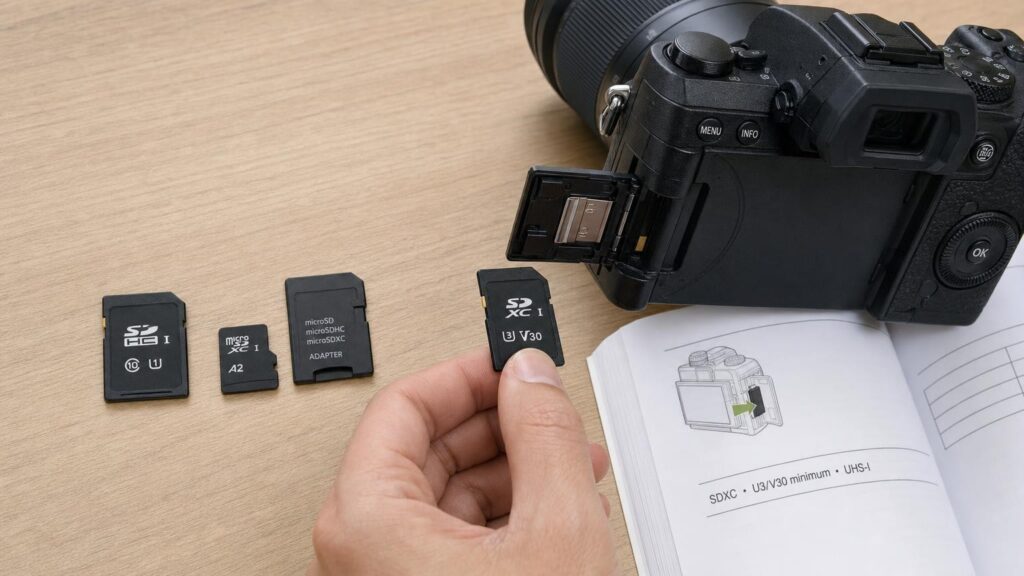
An SD card can carry several numbers and symbols at once: a capacity, a prominent transfer speed, a circled Class number, U1 or U3, a V-rating, an A-rating and an interface mark such as UHS-I or UHS-II. These labels describe different characteristics, so they cannot simply be ranked by choosing the largest number.
The right card is the one that meets the requirements of the device and workload. Before comparing headline speeds, identify the physical size, supported capacity family, required sustained-write performance and interface compatibility. This avoids paying for performance a device cannot use – or buying a card that cannot keep up with recording.
Start with size and capacity family
SD and microSD are physical formats
Full-size SD cards are commonly used in cameras, audio recorders and some computers. The smaller microSD format appears in phones, action cameras, handheld consoles, drones and compact electronics. A microSD card can often fit a full-size SD slot through a passive adapter.
That adapter mainly redirects the electrical contacts. It does not convert a slow card into a faster one, add capacity or bypass the limitations of the card, reader or device. Adapter condition can matter, however: damaged contacts or a loose fit may cause unreliable operation.
A full-size SD card cannot be reduced to fit a microSD-only slot. Start by checking which physical format the device accepts rather than assuming an adapter will solve every mismatch.
SD, SDHC and SDXC describe capacity families
The capacity family is separate from speed. Standard SD covers capacities up to 2 GB, SDHC covers capacities above 2 GB up to 32 GB, and SDXC covers capacities above 32 GB up to 2 TB. A card marked SDXC is not automatically faster than an SDHC card.
Host compatibility matters because older devices may recognise only particular families, capacities or file systems. A slot that accepts the physical card does not necessarily support every capacity available in that shape. Check the device manual or manufacturer guidance for its supported card type and maximum capacity before considering performance labels.
Separate advertised transfer speeds from guaranteed minimums
The largest speed printed on the packaging is commonly a maximum transfer or read figure achieved under favourable conditions. It may be useful when copying large files from the card through a suitable reader, but it is not necessarily the write speed available during recording.
Read speed describes how quickly stored data can be retrieved. Write speed describes how quickly new data can be saved. Cameras and other recording devices depend heavily on write performance, particularly when producing a continuous video stream or clearing a burst of photographs from an internal buffer.
Speed Class, UHS Speed Class and Video Speed Class markings are more relevant to these tasks because they express minimum sustained-write classifications. Even then, actual results depend on the host device, card reader, connection, file pattern and operating conditions. A fast card used in a limited reader can only transfer at the speed the complete chain supports.
Workload also matters. Moving one large video file is a sequential task, while loading many small application files involves random access. A card can perform strongly in one pattern without being equally strong in the other.
How Class, U1/U3 and V-ratings relate
The original Speed Class symbol is a number inside an open circle. Class 2, 4, 6 and 10 indicate minimum sustained sequential write speeds of 2, 4, 6 and 10 MB/s respectively.
UHS Speed Class uses a number inside a U-shaped symbol. U1 indicates a minimum sustained write speed of 10 MB/s, while U3 indicates 30 MB/s. U3 is therefore a write classification, not shorthand for the third generation of the UHS interface.
Video Speed Class is shown with a V followed by a number:
- V6: at least 6 MB/s sustained writing
- V10: at least 10 MB/s
- V30: at least 30 MB/s
- V60: at least 60 MB/s
- V90: at least 90 MB/s
These systems overlap. Class 10, U1 and V10 all communicate a 10 MB/s minimum within their respective classification systems, while U3 and V30 both indicate 30 MB/s. A card may display several symbols because it has been classified under more than one system.
A V30 card displaying a much larger maximum transfer figure is not contradictory. V30 addresses its minimum sustained-write class; the larger figure may describe a best-case read or transfer result. For recording, follow the class requested by the device manufacturer rather than substituting an unrelated headline number.
UHS-I, UHS-II and the device-side bottleneck
UHS-I and UHS-II describe bus interfaces – the communication path between the card and host. They are different from the U1 and U3 sustained-write ratings.
UHS-I cards use the familiar main row of contacts. UHS-II cards add a second row of contacts to support their faster interface when paired with a compatible host or reader. This physical difference can help shoppers identify the interface, but it does not replace checking the printed specification.
A UHS-II card can generally operate in a UHS-I host through the standard contacts, but it will not deliver UHS-II interface performance there. Similarly, putting a UHS-I card in a UHS-II reader does not transform the card into a UHS-II model. Performance is constrained by the slowest relevant part of the chain.
This is especially important when paying a premium for a faster interface. A newer card may still work in an older camera, but it cannot make that camera write faster than its controller allows. Faster offloading may also require a compatible reader and computer connection.
What A1 and A2 application ratings address
A1 and A2 are Application Performance Class markings. They address workloads involving random access to many small files, such as running or storing applications on supported devices. This differs from the long, sequential data stream produced by most video recording.
A2 sets higher random-performance requirements than A1, but reaching its potential depends more heavily on the host supporting the relevant features. In an incompatible host, an A2 card may not show the expected advantage and may operate more like a conventional card.
Application ratings should therefore be prioritised when the intended device uses the card for apps or similarly random workloads. They should not automatically outweigh a camera’s stated U3 or V30 requirement. A-rating, V-rating and interface generation answer different questions.
Match the card to the workload, not just the resolution label
Labels such as Full HD, 4K or 8K do not define one universal card requirement. Video data rates vary with frame rate, compression, colour settings and recording mode. Two devices recording at the same displayed resolution can write data at substantially different rates.
Begin with the device manual. Look for an explicit capacity limit, interface recommendation and minimum class such as U3 or V30. If the manufacturer publishes different requirements for different modes, use the requirement for the most demanding mode you intend to select.
Consider how the device writes data:
- Continuous video: sustained-write performance is central because the stream must be saved without interruption.
- Burst photography: card write speed can affect how quickly the camera clears its buffer, although the camera itself may remain the bottleneck.
- Occasional photographs: very high write classes may offer little practical benefit if files are small and pauses between shots are long.
- Apps and games: random access and host support can make A1 or A2 relevant.
- File transfer: read speed, reader capability and the computer connection influence offload time.
Meeting the stated minimum is more important than guessing from the resolution printed on a camera box. Buying above the requirement can provide flexibility for other compatible devices, but it does not guarantee a visible improvement in the current one.
Capacity, speed and recording time are different decisions
Capacity determines how much data the card can hold. Speed determines whether data can be written or read quickly enough for the task. A high-capacity card can still be too slow for a demanding recording mode, while a fast low-capacity card may fill quickly.
Recording time depends on the device’s actual data rate rather than resolution alone. Variable-bit-rate recording can also make remaining-time estimates approximate. Use guidance from the device manufacturer or estimates based on the selected recording mode instead of assuming that a particular capacity always provides a fixed number of hours.
One large card reduces swapping and can be convenient for long sessions. Several smaller cards can separate projects and limit how much material is tied to one card if it is lost, damaged or corrupted. Smaller cards require more management and increase the chance of misplacing one, while a single large card concentrates more data in one place. Neither strategy replaces backups.
Real-world ownership: readers, formatting and reliability
A suitable reader is necessary to obtain high transfer speeds outside the device. Check that it supports the card’s interface and that its connection to the computer is not the limiting factor. Poor contacts, hubs and older ports can all restrict results.
When appropriate, format a compatible card in the device that will use it, following the manufacturer’s instructions. This can establish the expected file system and folder structure. Formatting normally erases accessible content, so copy anything important first. Avoid repeatedly moving one card among devices with different formatting expectations without checking compatibility.
Safely stop recording before removing a card, use the operating system’s eject function when connected to a computer, and avoid interrupting an active write. Maintain backups because speed labels do not describe endurance, data-retention guarantees or immunity from failure.
Buy from a reputable seller and inspect unexpected behaviour. A card that reports an implausible capacity, corrupts files once partially filled or performs far below its markings may be faulty or misrepresented. Capacity and performance can be checked with established verification software on a trusted computer, but tests that write across the card can erase existing data. Back up files before testing.
A simple label-reading checklist
- Confirm the physical format. Check whether the device needs full-size SD or microSD.
- Check the capacity family and limit. Make sure the host supports SD, SDHC or SDXC and the chosen capacity.
- Find the required sustained-write class. Follow the device guidance for Class, U1/U3 or V-rating.
- Check the interface. Choose UHS-I or UHS-II with the host and reader capabilities in mind.
- Consider A1 or A2 only when relevant. These ratings concern application-style random access and depend on host support.
- Treat maximum speeds as conditional. They may describe favourable read performance rather than sustained writing.
- Plan for capacity and backups separately. More storage does not mean more speed or greater protection from data loss.
Reading an SD card is ultimately a process of separating its labels by purpose. Capacity tells you how much it can hold, sustained-write classes indicate whether it can maintain particular recording rates, the UHS generation describes the interface, and application ratings address random-access workloads. Match each of those characteristics to the device rather than allowing the largest printed number to make the decision.
Continue exploring on Frowse
Discover More Frowse Insights
- Why the Number on a Toaster Dial Usually Is Not Minutes
- Why Scissors Stop Cutting Even When the Blades Still Feel Sharp
- Why Staples That Look the Same Do Not Fit Every Stapler
- Choosing an Air Purifier for a Singapore Home: Room Size, Filtration and Haze
- Why Sandpaper Grit Numbers Do Not Tell the Whole Story