





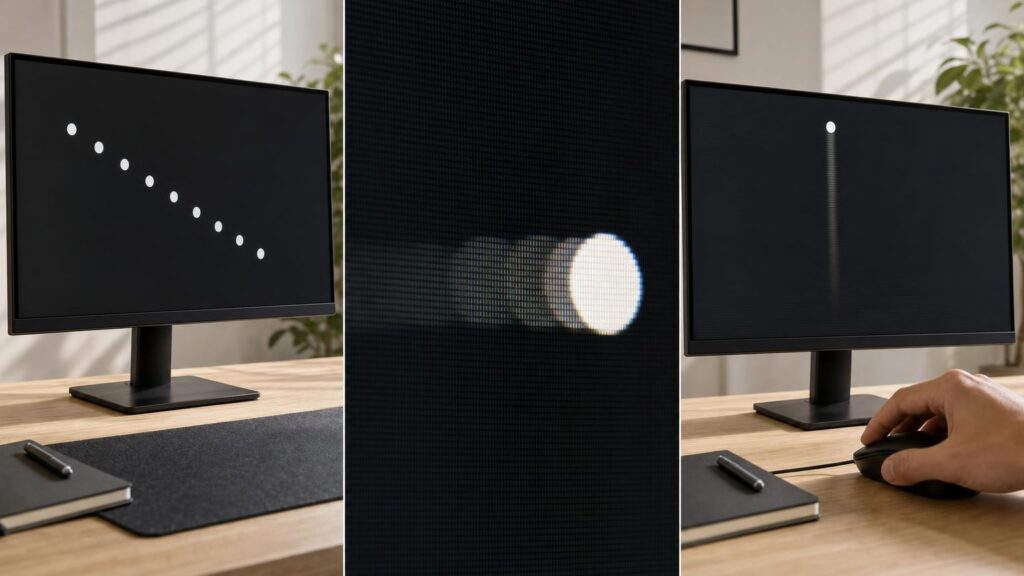
Monitor specifications often compress motion performance into a few attention-grabbing numbers. Refresh rate, response time and input lag may all sound like measures of speed, but they describe different stages between a computer producing a frame and your eyes seeing the result. One number cannot tell you whether motion will look clear, controls will feel immediate or a panel will behave consistently.
Understanding these distinctions helps you look beyond the smallest response-time claim or highest refresh-rate label. It also makes independent measurements more useful, particularly when comparing monitors for gaming, general computing and mixed use.
Why these three speed specifications are easy to confuse
All three specifications can affect the experience of movement, but they refer to separate events:
- Refresh rate describes how frequently the display can begin showing a new image.
- Response time describes how quickly individual pixels change from one shade to another.
- Input lag describes delay before a received image begins to appear on the screen.
These processes happen close together, so their visible effects can overlap. A slow pixel transition can make movement look smeared, while high input lag can make controls feel disconnected. A low refresh rate can make motion appear less fluid even when pixel transitions are quick.
Terms such as “fast”, “responsive” and “blur-free” do not identify which part of the chain has been measured. Shoppers therefore need to check both what a number measures and the conditions under which it was obtained.
Refresh rate: how often the display starts a new scan
Refresh rate is stated in hertz. It tells you how many refresh cycles a display can perform each second. A higher refresh rate shortens the interval between opportunities to present new visual information, which can make movement look smoother and reduce the time until a newly received frame can be displayed.
The monitor’s refresh rate is not the same as the frame rate produced by a computer or console. Frame rate describes how quickly the source renders frames; refresh rate describes how quickly the monitor presents them. The experience depends on how those two rates interact.
If the source consistently supplies frames at a rate that suits the display, a higher refresh rate can provide more frequent motion updates. If the source produces frames slowly or unevenly, the monitor cannot invent genuinely new stages of movement simply because its maximum refresh rate is high.
When frame delivery and fixed refresh cycles are not synchronised, a refresh may contain portions of different frames. This is seen as tearing. Conventional synchronisation can prevent tearing by making frame presentation wait for suitable refresh boundaries, but waiting may introduce judder or additional delay when frame delivery is inconsistent.
Refresh rate also affects persistence blur. On a conventional sample-and-hold display, each frame remains visible until it is replaced. Your eyes may track a moving object while the image stays in one position for that refresh interval, causing perceived blur even if the pixels changed quickly. More frequent refreshes reduce the time each image is held, provided genuinely updated frames arrive often enough.
Response time: how quickly pixels complete a transition
Pixels do not always change instantly when a new frame is scanned onto the panel. Response time measures the transition from one level to another, commonly using grey-to-grey testing. It is neither the refresh interval nor a measurement of how quickly the monitor reacts to an input signal.
A panel can have a short refresh interval while its pixels take too long to reach their intended values. The unfinished transition then carries into the next refresh, producing trails, smearing or reduced detail around moving objects. Conversely, fast pixel transitions do not make a low-refresh display update its image more frequently.
Transitions also vary. A change between two similar dark shades may behave differently from a change between a light and dark shade. Temperature, refresh rate and overdrive setting may also affect performance. A single quoted grey-to-grey value may represent selected transitions, a best result or a testing threshold rather than the panel’s overall behaviour.
Useful testing therefore examines a range of shade changes. It should show whether transitions are fast enough for the intended refresh rate and whether they reach the target cleanly rather than merely crossing a measurement threshold quickly.
Input lag: the delay before an action appears on screen
Input lag is often used loosely to describe the complete delay between pressing a button and seeing the result. That total is more accurately understood as system latency. It can include input-device polling, game or application processing, CPU and graphics work, frame queues, connection behaviour, display processing, scanout and pixel response.
Monitor input lag covers the display’s contribution after it receives the signal. The monitor may need to process, scale or otherwise prepare the image before scanning it onto the panel. Different operating modes can alter that processing path. Features such as image enhancement or scaling may affect delay, although the result depends on the individual display and configuration.
Pixel response is sometimes included in an end-to-end visual latency measurement, but it remains conceptually separate. A monitor may begin scanning a frame promptly while its pixels take longer to settle. It can therefore have low processing delay but visibly slow transitions.
How refresh rate, response time and input lag interact
Consider a high-refresh monitor with slow pixel transitions. New frames can start frequently and controls may feel responsive, yet moving edges can leave visible trails because pixels have not settled before subsequent frames arrive.
Now consider a panel advertised with a very small response-time figure but substantial image processing. Its pixels may complete certain transitions rapidly once instructed, but the monitor may wait before beginning scanout. The response-time claim alone cannot reveal that delay.
Even when processing is minimal and transitions are clean, refresh rate still controls how often a new scan can begin. At lower refresh rates, each frame persists for longer and opportunities to display updated input are less frequent.
Scanout adds another important detail: an entire frame does not normally become visible everywhere at exactly the same instant. The display updates progressively across the screen. Content near the beginning of the scan appears before content near the end, so measured latency depends partly on where the measuring point is located. This is why top, centre and bottom readings can differ without the monitor changing its processing delay.
Overdrive can improve transitions – and create new artefacts
Overdrive applies a stronger initial drive to help pixels approach a new value more quickly. Used well, it reduces trailing and allows transitions to fit more comfortably within the refresh interval.
More aggressive overdrive is not automatically better. If a pixel is pushed beyond its intended value, it must return to the target. This overshoot can produce bright or dark coronas behind moving objects, often called inverse ghosting. A setting that produces the smallest measured transition time may therefore look worse than a slightly slower, better-controlled mode.
The ideal setting may also vary with refresh rate. Strong overdrive that works acceptably near a monitor’s maximum refresh rate can become excessive when refresh intervals lengthen. A balanced monitor should ideally maintain clean transitions across the rates at which it will actually be used, not just under one favourable test condition.
When comparing reviews, look for transition charts, overshoot information and visual examples at several refresh rates. A mode described as “fastest” may simply use the strongest overdrive rather than deliver the best overall motion quality.
Variable refresh rate changes the conditions
Variable refresh rate, or VRR, allows a compatible display to vary the timing of refreshes so that they follow frame delivery more closely. When rendering time changes from frame to frame, VRR can reduce tearing and the judder associated with presenting uneven frames on a fixed schedule.
VRR does not directly make pixels transition faster. It changes when refreshes occur, while response behaviour still depends on the panel and its overdrive tuning. It also does not guarantee that a game will run near the monitor’s maximum refresh rate.
This makes performance across the VRR range important. A monitor may need different levels of overdrive at different refresh rates. Some displays adjust this behaviour more effectively than others, while some require a compromise setting. Shoppers should examine results at frame rates their hardware can realistically sustain rather than focusing only on maximum-refresh testing.
Reading motion-performance claims and measurements critically
A response-time label has limited value without a method. Check whether the figure is an average, a best-case transition or a selected result, and whether overshoot is counted. Also note the refresh rate and overdrive mode used for testing.
Grey-to-grey response time should not be confused with motion-picture response time. Grey-to-grey concerns physical pixel transitions. Motion-picture response time is associated with how long an image remains visible and therefore relates closely to persistence blur. The terms describe different contributors to perceived motion clarity.
Some monitors use backlight strobing or related techniques to reduce persistence. Instead of illuminating the image continuously throughout each refresh, the light is presented for a shorter period. This can improve tracked-motion clarity, but it may reduce brightness and introduce visible flicker, duplicated edges or other artefacts if timing and frame delivery are unsuitable. Strobing may also limit or conflict with VRR operation, depending on the implementation.
Ambiguous labels such as “motion blur reduction” do not reveal which mechanism is being used. Determine whether a claim refers to pixel transitions, a strobing mode, refresh rate or a calculated marketing figure. These are not interchangeable.
Choosing the right balance for how the monitor will be used
The best balance depends on workload, frame-rate capability and sensitivity to artefacts. Fast-paced competitive games place greater emphasis on frequent refreshes, low display delay and transitions that remain clean at high rates. Slower games may benefit more from consistent VRR behaviour and strong image quality than from chasing the highest possible maximum.
Hardware capability matters too. A very high maximum refresh rate has less practical value if the system rarely supplies frames in that region. In that case, behaviour at moderate refresh rates, VRR consistency and suitable overdrive may be more relevant.
For everyday productivity, creative work and mixed use, refresh rate can still improve scrolling and pointer movement. However, resolution, colour behaviour, contrast, viewing comfort, connectivity and ergonomics may deserve equal or greater weight. Motion specifications should be considered alongside the monitor’s complete purpose.
A practical comparison checklist
- Compare refresh rate with the frame rates your computer or console can realistically deliver.
- Look for response testing across many transitions, not only the smallest advertised figure.
- Check whether faster overdrive modes introduce overshoot or inverse ghosting.
- Examine performance at several refresh rates, especially if you plan to use VRR.
- Distinguish monitor input lag from complete system latency and pixel response.
- Confirm where latency was measured because scanout position affects the result.
- Treat blur-reduction modes separately from ordinary grey-to-grey performance.
- Balance motion clarity and responsiveness against image quality and everyday features.
No single speed number can summarise a monitor. Refresh rate determines how often new scans can occur, response time describes how pixels move towards new values, and input lag concerns when the display begins presenting received information. The strongest choice is the monitor that balances all three under the conditions in which you will actually use it.
Continue exploring on Frowse
Discover More Frowse Insights
- Inside a Fishing Reel: What Drag, Gear Ratio and Spool Design Actually Change
- Why Noise-Cancelling Headphones Work Better on Some Sounds Than Others
- Why the Hook on a Tape Measure Is Supposed to Move
- Tempered Glass, PET, TPU and Liquid Adhesive Screen Protectors Explained
- Suction, Airflow and Floorheads: What Really Determines Vacuum Cleaning Performance