


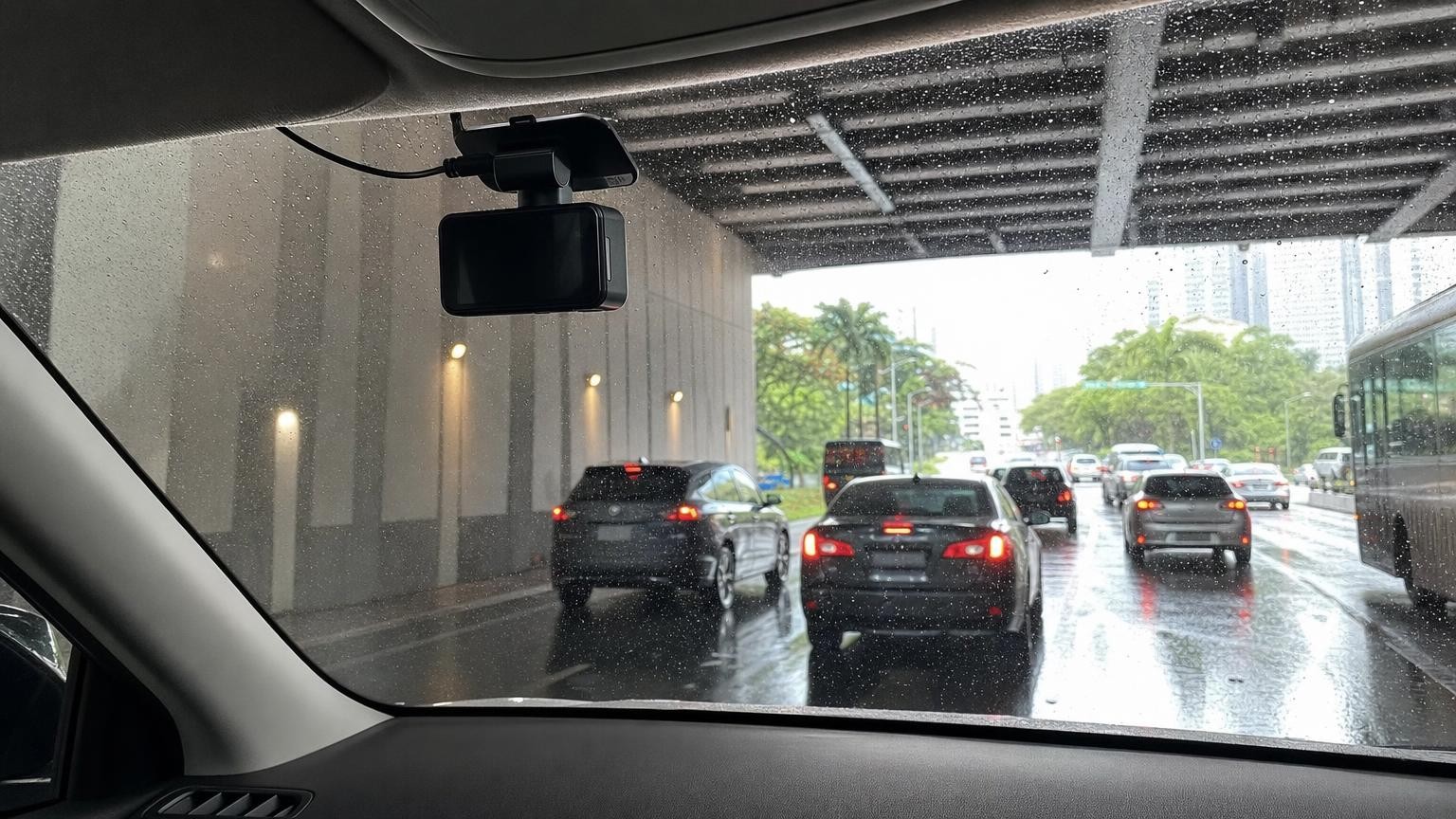
A dash cam needs to do more than display an impressive resolution number. In Singapore, dense traffic, changing light, heavy rain and prolonged heat can expose weaknesses in image processing, mounting, power supply and storage. The right choice depends on what you want to record, whether you need protection while parked and how much installation work you are prepared to accept.
Use the following considerations to compare dash cams on practical performance rather than on headline specifications alone.
What Singapore driving conditions demand from a dash cam
Singapore driving can involve closely spaced vehicles, busy junctions, covered car parks, tunnels and rapid transitions between bright sunlight and shade. A useful dash cam must adjust quickly enough to preserve detail as lighting changes. Heavy rain can further reduce contrast and increase reflections, particularly at night.
Heat is another important consideration. A camera mounted near the top of a windscreen may remain exposed to strong sunlight while the vehicle is parked. Temperature suitability, mounting quality and power design therefore deserve as much attention as resolution.
Start by defining the evidence you want the camera to capture. This might include the road ahead, incidents behind the car, activity inside a passenger-carrying vehicle or events while parked. That decision determines the number of cameras, storage requirements and installation complexity.
Image quality: look beyond the resolution label
Higher resolution can help reveal details, but it does not guarantee clear number plates or useful night footage. Sensor performance, lens quality, video bitrate, exposure control, compression and image processing all affect the final recording.
A camera needs to balance very bright and dark parts of a scene. High-dynamic-range processing can be useful when leaving a covered car park, driving under alternating shade or facing headlights at night. However, the presence of an HDR label alone does not establish how well a particular model handles movement or difficult lighting.
Bitrate matters because it affects how much information is retained in the video. Aggressive compression can remove fine detail even when the file has a high stated resolution. Higher-bitrate footage generally creates larger files, so image quality and storage duration need to be considered together.
Field of view versus distant detail
A wide field of view can include neighbouring lanes, pavements and activity approaching from the side. The trade-off is that objects may occupy fewer pixels and appear smaller. An extremely wide lens can also produce noticeable distortion near the edges.
A moderate view may preserve more useful detail directly ahead, while a wider view provides broader context. Neither is automatically better. Consider the camera’s mounting position, the size of the vehicle and whether side context or forward detail is more important to you.
Low-light performance
Night footage depends heavily on the sensor and processing rather than resolution alone. Look for representative footage recorded in genuinely difficult conditions, including moving traffic, covered roads and scenes with bright lights against dark backgrounds. Comparisons are most useful when the cameras are recorded at similar times and without unexplained editing.
No dash cam can guarantee that every plate will be readable. Distance, speed, rain, reflections, dirty glass and headlight glare all influence the result. Treat plate capture as a demanding real-world task rather than an assured feature.
Front-only, front-and-rear or cabin coverage
A front-only camera is generally the simplest and least intrusive option. It requires less wiring, consumes less storage and may be enough if your priority is recording the road ahead.
A front-and-rear system adds context for rear impacts, following vehicles and events behind the car. The rear camera normally needs a cable routed through the cabin, and installation may be more involved in vehicles with tailgates or movable trim. Two video streams also use storage more quickly than one.
A cabin camera is different from a rear road camera. It points inward to record occupants and the interior rather than traffic through the rear windscreen. Cabin coverage may be relevant for shared vehicles or passenger-carrying use, but it introduces stronger privacy and audio-recording considerations.
Some systems combine all three viewpoints. This offers broad coverage but increases cost, wiring, power use and file-management demands. Choose the fewest viewpoints that meet a defined need instead of assuming that more cameras always produce a better ownership experience.
Heat tolerance and installation in a tropical climate
Check the manufacturer’s stated operating and storage temperature ranges, paying attention to which range applies when the camera is working. Specifications cannot predict every installation, but they offer a more useful basis for comparison than vague claims about tropical suitability.
Many shoppers prefer capacitor-based dash cams for hot environments because the capacitor is used to provide short-term power for orderly shutdown rather than extended operation. This design choice should still be considered alongside the complete camera specification and installation.
Mounting components matter too. Adhesive mounts are usually compact and stable, but they must be applied to clean glass and can be less convenient to reposition. Suction mounts are easier to move but may be bulkier. Confirm whether replacement adhesive pads are available if the camera may be transferred between vehicles.
A discreet position near the top of the windscreen can reduce distraction, but the lens still needs a clear view through the swept area of the glass. Avoid placing it behind tinted or patterned sections that obstruct the image. Check the recorded angle after installation rather than judging alignment from the camera body alone.
Parking recording and how the camera is powered
Standard driving recording begins when the camera receives power and usually stops after the ignition is switched off. Parking recording is different: it is intended to monitor the vehicle while parked, subject to the camera’s power supply and selected settings.
Parking modes may save clips after an impact, respond to detected movement or use time-lapse recording. Each approach has limitations. Impact detection can miss events that do not create enough vibration, while motion detection may produce many files in a busy location. Time-lapse can cover longer periods with less storage but may record fewer frames and omit audio.
Comparing power options
- 12V accessory socket: Usually the simplest option and easy to remove. Some vehicle sockets switch off with the ignition, which prevents conventional parked recording; others may remain powered. Confirm how your vehicle behaves rather than assuming.
- Hardwiring: Can provide a neater installation and a suitable supply for parking mode. It requires correct connection, cable routing and battery-drain safeguards. Professional fitting may be worthwhile if you are unfamiliar with vehicle electrical systems.
- Dedicated dash cam battery pack: Can power parked recording without relying on the starter battery in the same way. It adds cost, occupies space and needs an appropriate charging arrangement.
If parking mode matters, check whether the required hardwire kit, voltage cut-off function or battery pack is included or sold separately. Also consider how long you realistically need monitoring to continue. Recording duration varies with camera count, settings, available power and environmental conditions.
Storage, file management and everyday reliability
Dash cams normally use loop recording. When the card becomes full, the camera overwrites the oldest ordinary files. Event clips may be protected from automatic deletion, although a card can eventually fill if too many protected files accumulate.
Capacity affects how much footage remains before it is overwritten, but the camera must support the chosen card capacity and format. Higher resolutions, higher bitrates and additional camera channels all shorten the available recording window.
Continuous video places repeated write cycles on a memory card. Use a card type and speed rating approved by the camera manufacturer, with an endurance rating suitable for sustained recording where specified. A general-purpose card may not be the best fit for this workload.
Before buying, confirm whether a card is included. Build several simple habits into ownership:
- Review sample recordings periodically rather than waiting until an incident occurs.
- Check that the date, time and camera angles remain correct.
- Format the card using the recommended method and interval.
- Watch for recording errors, repeated restarts or missing files.
- Replace a card that shows signs of degradation or persistent errors.
It is also worth learning how to protect and export a clip before you need it urgently. If important footage exists, copy it promptly instead of relying on loop recording to preserve it.
Connectivity and extra features worth evaluating carefully
Built-in Wi-Fi can let a phone connect directly to the camera for setup, live viewing and file transfer. This is convenient for a screenless model, but large video files may take time to move. Check app compatibility with your phone, the permissions requested and whether the manufacturer provides clear update support.
An integrated screen makes alignment and playback straightforward but increases the camera’s size and can be distracting if left illuminated. A screenless design is more discreet but depends more heavily on indicator lights, spoken status messages or an app.
GPS can add location and speed information to footage. Decide whether that context is useful to you and whether you want it embedded in exported video. Voice control may reduce the need to touch the camera, although supported commands and recognition can vary.
Driver alerts may include warnings related to lane position, movement ahead or nearby cameras, depending on the model and region. Treat these as secondary conveniences rather than substitutes for attentive driving. Unwanted or false alerts can become distracting, and regional databases or functions may not always be applicable. None of these extras compensates for weak underlying footage.
Installation, privacy and responsible use in Singapore
Install the camera so that it does not unnecessarily obstruct the driver’s view, and secure cables away from controls, moving parts and areas where they could interfere with vehicle equipment. Take particular care around pillars and other locations that may contain airbags. If in doubt, use an installer familiar with the vehicle.
Privacy also deserves attention, especially when recording passengers, audio or activity inside the cabin. Consider how people will be informed, who can access the files and how long footage will be retained. Share recordings cautiously because video can contain faces, conversations, number plates and location information.
Requirements and guidance can change, and different considerations may apply when footage is recorded, published or used for a particular purpose. Verify current Singapore rules with appropriate official sources rather than treating general buying guidance as legal advice. If you drive into another country, check the applicable requirements there as well.
A final checklist for choosing confidently
- Choose the viewpoints: Decide whether you need front, rear or cabin evidence.
- Prioritise usable footage: Compare sensor performance, exposure handling, bitrate and low-light examples, not resolution alone.
- Check heat suitability: Review temperature specifications, power design, mount type and installation position.
- Decide on parking coverage: Select the parking mode and power arrangement that fit your actual needs.
- Plan the installation: Confirm cable routes, socket behaviour, hardwiring requirements and whether professional fitting is appropriate.
- Confirm storage needs: Check supported capacities, card requirements and whether a suitable card is included.
- Evaluate extras realistically: Make sure apps, GPS, screens and alerts add practical value without distracting from core recording quality.
- Budget for the complete setup: Include memory cards, hardwire kits, battery packs, replacement adhesives and fitting where required.
A well-chosen dash cam is one that records the viewpoints you genuinely need, operates within an appropriate power and temperature setup, and makes footage easy to retrieve. Focusing on those everyday requirements will lead to a more dependable choice than selecting by resolution or feature count alone.
Continue exploring on Frowse
Discover More Frowse Insights
- How Frost-Free Refrigerators Manage Heat, Air and Moisture
- Why Tennis Balls Come in Pressurised Cans – and What Changes After Opening
- Inside a Fishing Reel: What Drag, Gear Ratio and Spool Design Actually Change
- What Feed Dogs, Presser Feet and Hooks Do in a Sewing Machine
- Fixed-Speed vs Inverter Air Conditioners: What Compressor Modulation Really Changes